

Resurf icon
Resurf icon

Resurf

 18 likes

Rapidly capture links, notes, images, and media into a private, local inbox, organize using spaces, browse visually via cards, search and filter, read distraction-free articles, view PDFs natively, and use keyboard shortcuts, with AI features planned soon.
Resurf screenshot 1

Cost / License

  • Pay once
  • Proprietary

Application type

Since

  • Since 2026

Platforms

  • Mac
18likes
0articles
Save

Features

Properties

Features

Highlights All activities

Resurf News & Activities

Recent News

No news, maybe you know any news worth sharing?

Share a News Tip

Recent activities

Resurf information

  • Licensing

    Proprietary and Commercial product.
  • Pricing

    One time purchase (perpetual license) ranging between $29 and $49.
  • Alternatives

    41 alternatives listed
  • Badge

    Get an embeddable badge for Resurf
  • Supported Languages

    • English

Our users have written 2 comments and reviews about Resurf, and it has gotten 18 likes.

Resurf was added to AlternativeTo by Paul on and this page was last updated .

Comments and Reviews

   
AvaBrown
0

Wouldn't mind switching to the app but I need a bulk import from Raindrop

Review from a new or low-activity account — shown here, but not counted in the app rating.
Guest
0

I like the one time purchase apps with such beautiful UI/UX. Looking forward to the new features promised by the founder.

Review from a new or low-activity account — shown here, but not counted in the app rating.

What is Resurf?

Capture things worth resurfacing.

A personal library and quick capture tool for thoughts, ideas, links, visuals, and more.

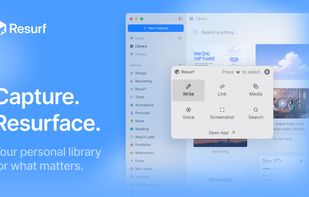
  • Capture in Seconds: Capture links, notes, images, voice, or media using a shortcut or drag and drop.
  • Inbox First: Everything you capture goes into one inbox, so you can stay focused and organize later.
  • Organize Over Time: Move captures into spaces when you're ready. Keep things simple or structured, it's up to you.
  • Visual Library: Browse your captures as cards with previews, making them easy to recognize at a glance.
  • Search & Filter: Search your captures and filter by type to quickly find what you need.
  • Keyboard Friendly: Navigate and open captures using the keyboard, without switching apps.
  • AI: AI-powered summaries and transcriptions will be available soon.
  • Reader Mode: Read web articles in a clean, distraction-free view right inside the app.
  • PDF Viewer: View and browse PDFs natively without switching to another app.
  • Private & Local-First: Your data stays on your Mac. Nothing is uploaded or shared unless you choose to.