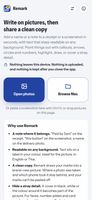
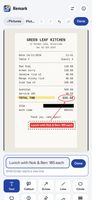
Remark lets you write and draw on a photo or screenshot, then share a clean copy. Add a name to a receipt, point to a button in a screenshot, or number the steps on a photo, in seconds, on your own device.
Text that reads anywhere. Words sit on a label in your colour, with black or white letters, whichever reads better on any background. English and Thai text look the same on every device.
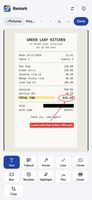
Point things out. Callouts, arrows, lines, circles, boxes and numbered markers. A highlighter that keeps the text readable, a pen for a tick or a signature, and crop.
Cover a stray detail. Black, white or the colour from around it. Only a cover hides anything: it replaces the pixels underneath.
Quick for repeat notes. Your last few texts are offered above the text box, so a name you write on every receipt is one tap.
A clean copy. Your marks are drawn into a brand-new picture, with no layers anyone could peel off. Covers are checked pixel by pixel, and the location, phone model and dates are removed. Your original is never changed.
Many pictures at once: up to 20. Share them to Remark from your gallery or a chat app, or paste a screenshot with Ctrl+V on a computer.
Privacy. The Android app asks for no permissions at all: no internet, no storage, no camera. The web app blocks every network connection. No account, no ads, no analytics.
Where it runs. Any modern browser, or the Android app (7.0 and later) from GitHub releases.
How it's made. One person designs it and tests every version on real phones (Pixel 7a with GrapheneOS, Pixel 6 Pro with stock Android, Poco X3 Pro with Evolution X). The code is written with Claude, Anthropic's AI; CodeRabbit, an independent AI code reviewer, checks every update; all of it is public on GitHub.
Free and open source under GPL-3.0. Not on Google Play: the studio supports Keep Android Open.









 AnonacondaCodeLab added Remark by Anonaconda Code Lab as alternative to Markup, Sitch, FlowInk, ImageMarkup - Annotate images and PDF and 1 more


No comments or reviews, maybe you want to be first?