





Rekody
12 likes
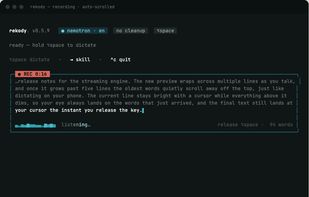
Open-source Mac dictation tool offering real-time, private voice-to-text conversion in any app using an Alt+Space shortcut, with hands-free and CLI options. Keeps all data local without accounts or analytics, making it suitable for privacy-conscious users.

Cost / License
- Free
- Open Source (MIT)
Application type
Platforms
- Mac
- Homebrew


Features
Highlights All activities
Rekody News & Activities
Recent activities
- InsteadOf liked Rekody
 Paul added Rekody as alternative to Reed Dictation
- Vyom Mengar liked Rekody
 Vitalii Yemets added Rekody as alternative to HoldToType



Developed by
 Tony Kipkemboi
 Licensing
Open Source (MIT) and Free product.Written in
Alternatives
68 alternatives listedBadge
Get an embeddable badge for RekodySupported Languages

AlternativeTo Categories
Audio & Music, OS & Utilities, System & HardwareGitHub repository
- 32 Stars
- 3 Forks
- 12 Open Issues
- Updated


No comments or reviews, maybe you want to be first?