HoldToType icon
HoldToType icon

HoldToType

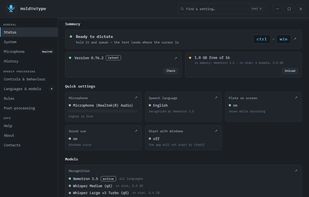
HoldToType turns speech into text without sending anything to the cloud. Hold a keyboard shortcut, say a sentence, let go — the recognised text is inserted where the cursor already was, in any program: an editor, a browser field, a terminal, a chat window.

HoldToType screenshot 1

Cost / License

  • Free
  • Open Source (MIT)

Application type

Platforms

  • Windows
0likes
0comments
0articles

Features

Properties

  1.  Privacy focused
  2.  Local-First

Features

  1.  Dictation
  2.  Push to talk
  3.  Offline
  4.  Golang
  5.  Speech to text

HoldToType News & Activities

Highlights All activities

Recent activities

HoldToType information

  • Developed by

    UA flagvyem
  • Licensing

    Open Source (MIT) and Free product.
  • Written in

  • Alternatives

    45 alternatives listed
  • Supported Languages

    • English
    • German
    • French
    • Spanish
    • Italian
    • Polish
    • Ukrainian
    • Russian

AlternativeTo Categories

Audio & MusicAI Tools & Services

GitHub repository

  •  0 Stars
  •  0 Forks
  •  0 Open Issues
  •   Updated  
View on GitHub
HoldToType was added to AlternativeTo by Vitalii Yemets on and this page was last updated .
No comments or reviews, maybe you want to be first?

Official Links

What is HoldToType?

HoldToType turns speech into text without sending anything to the cloud. Hold a keyboard shortcut, say a sentence, let go — the recognised text is inserted where the cursor already was, in any program: an editor, a browser field, a terminal, a chat window. Your clipboard is restored afterwards.

Recognition runs on your own computer. The speech engines — whisper.cpp and sherpa-onnx — ship with the app, and models are downloaded once and stay on disk. While a dictation is happening, no request leaves the machine. There is no account, no subscription and no telemetry.

Each language can be given its own model. Whisper covers about a hundred languages out of the box; narrow models can be twenty times faster and more accurate for a single language, and a streaming model shows the words on screen while you are still speaking. The app can also translate as you dictate: speak one language, type another.

After recognition the text passes through rules you set: replacements for names and in-house terms, a dictionary of rare words, and voice commands such as "new paragraph". Optionally a local language model, run by llama.cpp, cleans up filler words, fixes punctuation or changes the tone — again on your own disk, unless you deliberately point it at an external endpoint.

The program is portable: the folder is the program, models included, and deleting the folder is the whole uninstall. The interface comes in eight languages and five designs, and every setting applies the moment you change it.