




RecordPlease
Like
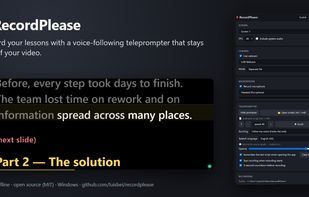
Free, offline teleprompter that follows your voice and records screen, webcam and mic. Hidden from the recording. For lectures and presentations. Windows, MIT.

Platforms
- Windows


Features
Highlights All activities
RecordPlease News & Activities
Recent activities
- luisbei added RecordPlease
 luisbei added RecordPlease as alternative to PromptSmart, SpeakoFlow, CuePrompter, Teleprompter Premium and 3 more

Developed by
luisbeiLicensing
Open Source (MIT) and Free product.Written in
Alternatives
7 alternatives listedBadge
Get an embeddable badge for RecordPleaseSupported Languages

AlternativeTo Category
Video & MoviesGitHub repository
- 3 Stars
- 0 Forks
- 0 Open Issues
- Updated



No comments or reviews, maybe you want to be first?