
Reading Tool icon
Reading Tool icon

Reading Tool

 1 like

Reading Tool is a free browser-based reading workspace designed to make reading more comfortable, focused, and organized.
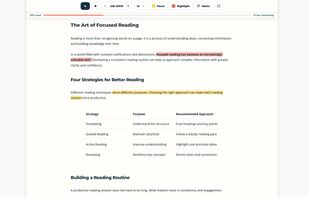
Highlight important passages and automatically collect them in the Notes panel for easy reference and review.

Cost / License

  • Free
  • Proprietary

Application type

Since

  • New

Platforms

  • Online
1like
0articles
Save

Features

Properties

Features

Highlights All activities

Reading Tool News & Activities

Recent activities

Reading Tool information

AlternativeTo Categories

News & Books, Office & Productivity
Reading Tool was added to AlternativeTo by web-tools-trainers on and this page was last updated .

No comments or reviews, maybe you want to be first?

What is Reading Tool?

Reading Tool is a free browser-based reading workspace designed to make reading more comfortable, focused, and organized.

It allows users to read their own text with adjustable reading speed, automatic or manual reading progression, and a customizable reading pacer. Unlike traditional speed readers that display words individually, Reading Tool keeps the full text visible while guiding readers through the content at their preferred pace.

Users can highlight important passages, which are automatically added to the Notes section for easy reference. They can also create their own notes, making it easier to organize key information and revisit important parts of a text.

Reading Tool supports keyboard shortcuts for controlling reading sessions, navigating through text, and managing reading functions. Many actions can be performed without using a mouse, allowing users to follow the reading pacer and maintain focus with minimal interruptions.

These features make Reading Tool useful for studying, reviewing articles, reading longer texts, taking notes, and maintaining concentration during reading sessions.

Reading Tool works directly in the browser without requiring installation or an account.