
RDP123 icon
RDP123 icon

RDP123

 1 like

A native RDP client for macOS with multiple remote Windows sessions, clipboard and file transfer, remote audio, and Microsoft Entra sign-in.
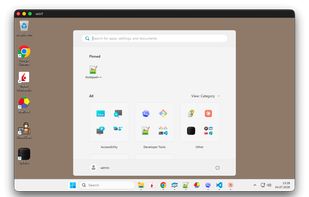
A remote Windows 11 desktop in a native RDP123 session window on macOS.

Cost / License

Since

  • Since 2026

Updated

  • Updated Nov 2026

Platforms

  • Mac  macOS 11 or later; Apple Silicon (M1 or newer). Intel Macs are not supported.
1like
0articles
Save

Features

Properties

Features

Highlights All activities

RDP123 News & Activities

Recent activities

RDP123 information

AlternativeTo Category

Network & Admin

GitHub repository

  •  1 Stars
  •  1 Forks
  •  3 Open Issues
  •   Updated  
View on GitHub

Popular alternatives

View all
RDP123 was added to AlternativeTo by Patrick on and this page was last updated .

No comments or reviews, maybe you want to be first?

Official Links

What is RDP123?

RDP123 is a free, open-source Remote Desktop Protocol client for macOS, written in Rust with a native AppKit interface. It runs in the menu bar and opens saved Windows connections in separate windows, with Dock and Command-Tab support while sessions are open.

The app supports Retina-aware resizing, fixed resolutions, full screen, and native remote cursors. You can copy text, files, and folders between Mac and Windows, play remote audio on the Mac, and control clipboard access per connection.

Connection profiles include automatic reconnect, Wake on LAN, optional session keep-alive, password-based NLA, and Microsoft Entra web authentication. Passwords are stored in the macOS Keychain. SSH profiles open in your preferred terminal using existing keys and configuration.

RDP123 has no advertising, telemetry, or required developer account. It requires macOS 11 or newer on Apple Silicon. Classic RDP graphics is the default, with experimental RDP 8 graphics available per connection. Multi-monitor sessions and microphone redirection are not currently implemented.

Available as a signed, Apple-notarized DMG or through the official Homebrew tap. Install with Homebrew using: brew install --cask asd123ch/tap/rdp123