





RapidRAW
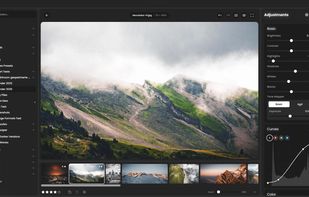
GPU-accelerated RAW photo editor for Windows, macOS, and Linux featuring non-destructive workflow, AI-driven masking tools, 32-bit precision, advanced color grading, tonal controls, batch operations, preset system, customizable interface, and comprehensive export options.

Cost / License
- Free
- Open Source (AGPL-3.0)
Application typeApplication types
Platforms
- Mac
- Windows
- Linux
- Flathub
- Flatpak


Features
RapidRAW News & Activities
Recent News
No news, maybe you know any news worth sharing?
Recent activities
 Mauricio B. Holguin added RapidRAW as alternative to Grain Photo
 Martijn-Courteaux added RapidRAW as alternative to SilverNode
- Cervo liked RapidRAW
 trashpanda62 added RapidRAW as alternative to Obscura Studio
- linusmuth liked RapidRAW
I have mixed feelings about RapidRaw. On the one hand, I am grateful it even exists. It offers a wonderful, powerful and free alternative to a host of other well known alternatives. The developer deserves many thanks and much admiration for his efforts.
However, I have struggled a bit with it. It seems counter-intuitive to me. Just when I am beginning to think I am getting to grips with it, I encounter another issue that seems to contradict the way the previous one worked. For example, I...
 morphy added RapidRAW as alternative to Stash - Asset Manager
 Paul added RapidRAW as alternative to PhotoFlare Lens


Featured in Lists


Create without Adobe (free n' paid) 2025


Powerful Open Source Creative Softwares


Linux • Graphics
Official Links
Install from the command line
winget install -e --id CyberTimon.RapidRAWflatpak install flathub io.github.CyberTimon.RapidRAW
What is RapidRAW?
RapidRAW information
Developed by
 Timon Käch
 Licensing
Open Source (AGPL-3.0) and Free product.Written in
Rating
Average rating of 4.8Alternatives
65 alternatives listedBadge
Get an embeddable badge for RapidRAWSupported Languages

AlternativeTo Categories
Photos & Graphics, System & Hardware, Video & Movies, AI Tools & ServicesGitHub repository
- 10,295 Stars
- 582 Forks
- 434 Open Issues
- Updated



Comments and Reviews
This is great, it does work out of the box and it provides some deep editing along with a quick browsing experience, and it is open source, and it runs on win/mac/linux. Amazing :)
I have mixed feelings about RapidRaw. On the one hand, I am grateful it even exists. It offers a wonderful, powerful and free alternative to a host of other well known alternatives. The developer deserves many thanks and much admiration for his efforts.
However, I have struggled a bit with it. It seems counter-intuitive to me. Just when I am beginning to think I am getting to grips with it, I encounter another issue that seems to contradict the way the previous one worked. For example, I was doing some minor perspective correction and when I had finished I had to hit "Apply". But when I wanted to do some further cropping there was no "Apply" button there. It took me ages to work out what to do - just click to return to "Adjustments". Dealing with things like that has meant it has taken ages for me to get to grips with it.
OK, so that's probably just me. Some software you just "click" with, but with others it seems like an impenetrable puzzle. RapidRaw has been tough for me to learn but I can see that once I have mastered it, it will be a valuable editing tool.
Nice UI, fast Reactions, a lot of Features, masterpiece of noise reduction and light AI features. I like it!
Amazing tool who made my wife's workflow so much better.
We moved to RawTherapee but she was overwhelmed and I also found it quite sluggish.
RapidRaw is the perfect replacement for it, easier, more to the point and the updates are fast and consistant. Good job!
very promising image editor just like raw therapy but a bit better
This looks like a promising FOSS alternative to Adobe Lightroom, I'll keep an eye on the project and probably support the dev financially or with translation contribution as the UI looks more intuitive than RAWTherapee or darktable
I feel exactly the same way.