RackStat icon
RackStat icon

RackStat

 1 like

Windows network monitor for stage devices, using concurrent ICMP ping polling and TTL analysis. It displays latency, supports temporary bypasses, configurable alarm audio and live configuration reloads, and offers optional HTTP remote monitoring and alarm resets.
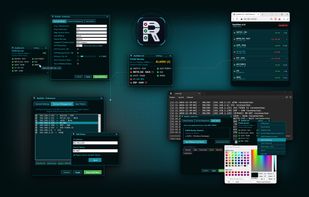
RackStat screenshot 1

Cost / License

  • Free
  • Proprietary

Since

  • New

Platforms

  • Windows  Windows SmartScreen may ask for your manual permission to run this app. If prompted, click 'More info' and then 'Run anyway'.
1like
0articles
Save

Features

Properties

Features

Highlights All activities

RackStat News & Activities

Recent activities

RackStat information

AlternativeTo Category

Network & Admin

Popular alternatives

View all
RackStat was added to AlternativeTo by Wagicb on and this page was last updated .

No comments or reviews, maybe you want to be first?

What is RackStat?

RackStat is a Windows network monitor built for live-event and stage production networks. It continuously pings the devices on a show network, such as mixing consoles, stage boxes, lighting nodes and video equipment, and shows at a glance which ones are online, offline or slow to respond.

Polling runs in parallel using ICMP pings and TTL analysis for an unlimited number of devices, with latency shown on hover and a visual indicator for each polling cycle. When a device drops, RackStat raises an audible alarm that can be routed to a separate audio output so it never reaches the main PA. Alarms are skipped for devices already offline at startup and stop automatically once everything is back online. Devices can be temporarily bypassed, reordered by drag and drop, and moved to the top of the list while their alarm is active.

Other features include IPv4 and duplicate-address validation, live reload of settings without restarting, light and dark color themes, compact or fixed multi-column layouts, multi-monitor window handling, an event log, and a built-in HTTP server for remote monitoring and alarm reset.