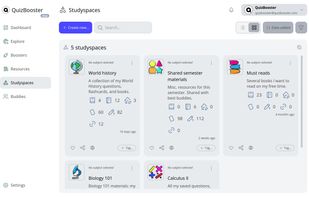
QuizBooster is an all-in-one academic study companion and a modern alternative to other study tools, designed for middle school, high school, college, and lifelong learners. Instead of forcing students to juggle separate flashcard apps, PDF viewers, and timer widgets across scattered browser tabs, QuizBooster unifies your entire study workflow into organized course workspaces called Studyspaces.
Whether you want to drill active recall flashcards, practice with custom mock exams, or organize notes for the semester, QuizBooster provides the tools to learn on your own terms.
Core Study Features:
Course Studyspaces: Organize textbooks, class notes, homework files, web links, flashcards, and question banks into dedicated workspaces for each subject or semester.
Active Recall Flashdecks: Flip flashcard decks with 3-state confidence scoring (Correct, Uncertain, Incorrect) and reverse recall (prompt-to-solution or solution-to-prompt).
Tailored Practice Tests: Build mock exams matching your exact study goals. Filter by subject, difficulty, and question format, including Multiple Choice, True or False, interactive Matching Pairs, and open-ended questions.
Full STEM and LaTeX Math: Native mathematical equation rendering for inline and block formulas across notes, flashcards, questions, and choices.
Instant Question Lookups: Split-second keyword search across thousands of questions, choices, and explanations without hunting through giant review PDFs.
In-Browser Document Reader: Read and annotate PDFs directly inside your workspace with pen and highlighter tools.
Pre-Loaded Explore Hub: Never start from an empty screen. Browse and import from a public library of over 300,000 curriculum flashcards and practice questions.
QuBit AI Assistant: Intelligent assistant that generates curriculum materials and evaluates written open-ended answers with feedback and partial credit.
Floating Focus Timers: Always-accessible floating stopwatch, countdown, and Pomodoro study or break timers that stay with you across every page.
Booster Buddies and Sharing: Share entire curated Studyspaces or decks with classmates in a single click, with granular privacy controls.






 EU
EU


 Paul added QuizBooster as alternative to Instaknow, Folderly - Academic Organizer and Cogent
 Melograno sp. z o.o.

No comments or reviews, maybe you want to be first?