




Quietly: Full Page Screenshot and Blur
Like
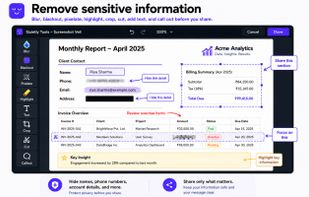
Quietly is a free browser extension for Chrome, Firefox and Edge that takes full page screenshots, including the parts you have to scroll to. Before you share, you can blur, pixelate or black out names, emails and numbers.

Cost / License
- Free
- Proprietary
Platforms
- Google Chrome
- Mozilla Firefox
- Microsoft Edge
- Vivaldi



Features
Quietly: Full Page Screenshot and Blur News & Activities
Highlights All activities
Recent activities
- Razzo added Quietly: Full Page Screenshot and Blur
 Razzo added Quietly: Full Page Screenshot and Blur as alternative to GoFullPage, FireShot and Awesome Screenshot

Quietly: Full Page Screenshot and Blur information
Developed by
 Quietly Tools
 Licensing
Proprietary and Free product.Alternatives
3 alternatives listedBadge
Get an embeddable badge for Quietly: Full Page Screenshot and BlurSupported Languages


No comments or reviews, maybe you want to be first?