QueryGlow icon
QueryGlow icon

QueryGlow

Self-hosted database GUI for PostgreSQL, MySQL, MariaDB, SQLite, CockroachDB and TimescaleDB. Web-based interface with AI SQL generation, EXPLAIN Visualizer, Safe Mode and SSH tunnels.
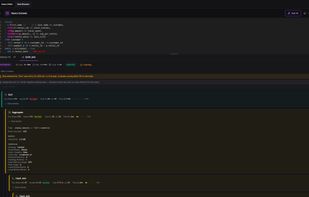
Query Editor with EXPLAIN Visualizer — visual execution plan tree with warnings, cost estimates and buffer analysis. All 6 supported databases visible in sidebar.

Cost / License

  • Pay once
  • Proprietary

Application type

Platforms

  • Self-Hosted
  • Docker
1like
0comments
0articles

Features

Properties

  1.  Lightweight
  2.  Privacy focused
  3.  AI-Powered

Features

  1.  Ad-free
  2.  Import CSV Data
  3.  Autocompletion
  4.  No Tracking
  5.  Dark Mode
  6.  SSH Tunnel
  7.  Database Management Tool
  8. MariaDB icon  Support for MariaDB
  9.  SQLite
  10. Docker icon  Support for Docker
  11.  Database Administration

QueryGlow News & Activities

Highlights All activities

Recent activities

QueryGlow information

  • Developed by

    DE flagMax Fischer
  • Licensing

    Proprietary and Commercial product.
  • Pricing

    One time purchase (perpetual license) that costs $79.
  • Alternatives

    11 alternatives listed
  • Supported Languages

    • English

AlternativeTo Categories

DevelopmentNetwork & Admin
QueryGlow was added to AlternativeTo by Max on and this page was last updated .
No comments or reviews, maybe you want to be first?

What is QueryGlow?

QueryGlow is a self-hosted, web-based database GUI you deploy on your own server with Docker. One interface for six databases: PostgreSQL, MySQL, MariaDB, SQLite, CockroachDB and TimescaleDB.

Core features:

  • AI SQL Generation: Ask questions in plain English, get valid SQL. Supports OpenAI, Claude and Gemini. Bring your own API key. Only schema metadata is sent, never your actual data.

  • EXPLAIN Visualizer: See query execution plans as interactive visual trees. Highlights sequential scans on large tables, disk sorts and wrong row estimates. Supports all six databases.

  • Safe Mode: Blocks destructive operations by default. DROP TABLE, TRUNCATE, DELETE without WHERE clause — all blocked unless you explicitly turn it off. Essential for production databases.

  • SSH Tunnels: Built-in SSH tunnel support. Paste your private key, connect to remote databases without opening firewall ports or running terminal commands.

  • Monaco Editor: Same editor engine as VS Code. SQL autocomplete for table names, column names and keywords. Syntax highlighting. Keyboard shortcuts.

  • CSV Import: Auto-detects delimiters, maps columns, validates before committing. Three strategies: INSERT (skip duplicates), UPSERT (update existing) and REPLACE.

  • CSV Export with formula injection protection.

  • Query History: Every query saved automatically. Searchable, per-connection.

  • Saved Queries: Name and organize your frequently used queries.

  • Connection Management: Save multiple connections with environment labels (Development, Staging, Production). Production connections show a red warning banner.

  • Security: AES-256-GCM encrypted credentials. Zero telemetry. Zero tracking. HTTPS with auto-renewing SSL.

  • Dark and light theme.

Pricing: $79 once. Lifetime access, all v1.x updates, unlimited users, unlimited databases. No per-seat fees, no subscription.

Deployment: Docker Compose in 2 minutes. Works on any VPS (Hetzner, DigitalOcean, AWS, etc.).

QueryGlow Videos

Official Links

