


Qubes OS
Qubes is an open source operating system designed to provide strong security for desktop computing.

Features
Properties
- Security-focused
- Privacy focused
- Lightweight
- Customizable
Features
- Virtualization
- Software Compartmentalization
- Container Virtualization
- Domain isolation
- No Tracking
- Ad-free
- Tor
- No registration required
- Command line interface
- Linux-based
- Two-factor Authentication
- Works Offline
- Rolling Release
- Dark Mode
- Portable
- Based on Fedora
- Hypervisor
Qubes OS News & Activities
Recent News
- Fla published news article about Qubes OS
 Qubes OS 4.3.0 released with Fedora 41, Xen 4.19, updated templates
Qubes OS 4.3.0 is now available, featuring a Dom0 upgrade to Fedora 41 and Xen 4.19. The update enf...
- POX published news article about Qubes OS
 Qubes OS 4.2 released with Dom0 upgraded to Fedora 37 and PipeWire support
Qubes OS, a Linux distribution that describes itself as a “reasonably secure operating system”, has...
- Ola published news article about Qubes OS
 Qubes OS 4.1.2 Released with Fedora 37 Template and USB Keyboard Support
Qubes OS has released its newest version, Qubes 4.1.2, with all 4.1 dom0 updates to date. This vers...


Recent activities
- almondelf2 liked Qubes OS
 POX added Qubes OS as alternative to VitruvianOS
- Begenmedikler1m liked Qubes OS
 Marco-M-Mariani added Qubes OS as alternative to MODICIA O.S.
- hoxosta-playing865 liked Qubes OS


Featured in Lists

The ultimate list of apps/services for better Security, Privacy & Anonymity; Defense against Surveillance. What …

Privacy is a far more serious concern than most people realize. Personal data could be used to steal your identity, …

I have noticed in general that the recommendation list for alternatives on this site is broken when it comes to Linux …
What is Qubes OS?
Qubes is an open source operating system designed to provide strong security for desktop computing.
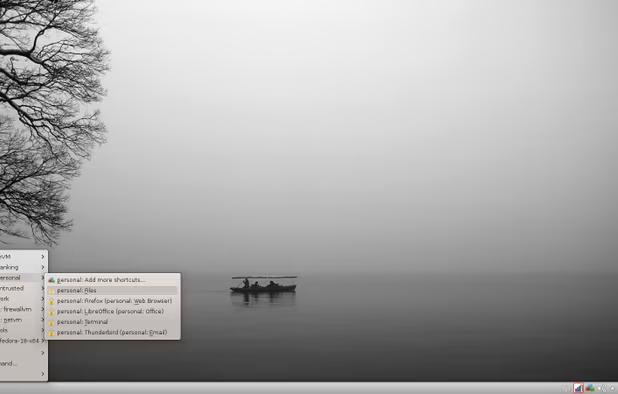
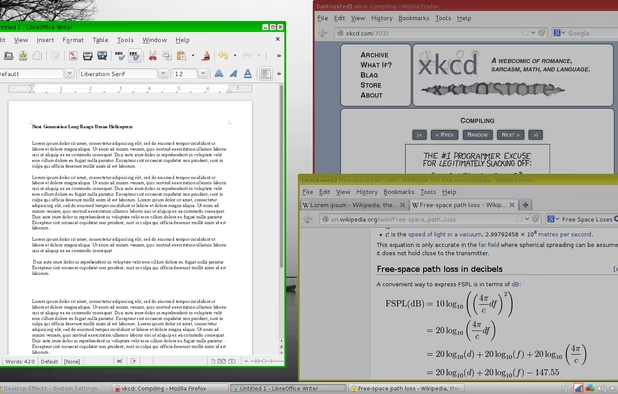
Qubes takes an approach called security by compartmentalization, which allows you to compartmentalize the various parts of your digital life into securely isolated compartments called qubes.
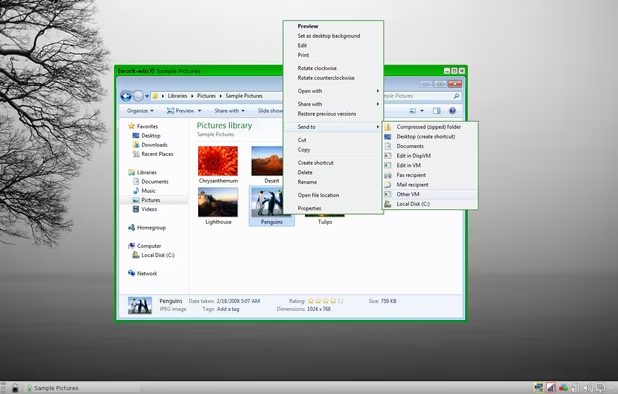
This approach allows you to keep the different things you do on your computer securely separated from each other in isolated qubes so that one qube getting compromised won’t affect the others. For example, you might have one qube for visiting untrusted websites and a different qube for doing online banking. This way, if your untrusted browsing qube gets compromised by a malware-laden website, your online banking activities won’t be at risk. Similarly, if you’re concerned about malicious email attachments, Qubes can make it so that every attachment gets opened in its own single-use disposable qube. In this way, Qubes allows you to do everything on the same physical computer without having to worry about a single successful cyberattack taking down your entire digital life in one fell swoop.
Qubes OS Videos
Qubes OS information
Developed by
 Qubes OS
 Licensing
Open Source and Free product.Rating
Average rating of 3.8Alternatives
196 alternatives listedNews
3 news article related to Qubes OSSupported Languages
- English


Comments and Reviews
I have used Qubes OS as my primary desktop at home and work for four months, and believe it to be the most effective and reasonably secure operating system available. It can be a little fiddly to set up and use, and you do have to want to run Qubes OS, but after using it, every other operating system feels unsecure. I do not want my SSH keys, private documents, and photos in the same place where a browser or other networked software runs. Browsers are complex and serious flaws seems to be reported regularly for all browsers. I wonder how many flaws are not reported.
I love the ease of use of Tails, Windows 10, TrueOS, Fedora Xfce, and macOS. But their monolithic design (private information and connected applications together in the same environment) worries me. In a world where nothing is perfect, Qubes OS's use of Xen virtualisation seems like a reasonable, effective, and surprisingly easy-to-use approach for the technically inclined, especially given the alternatives. I'm just a guy, but Qubes OS makes me cautiously optimistic about my online privacy and security. Nothing is perfect, but Qubes OS goes above and beyond any other system that I know about.
On what hardware (CPU/Motherboard/GPU) combination did you get it to work?
Very slow and unusable and I have a powerful conputer 12GB ram and an i7 and Nvidia940m. I cant even use firefox and browse the web without it buffering for 5 minutes! Great concept of VMs for security but really buggy so unless they fix it im not using it. Linux Tails or Subgraph OS is a much better choice for me, or you can get Debian and get Virtualbox and run VMs that way.
There's probably something else wrong with your system. I have a i5 with just 4GB RAM and Qubes OS worked quite good at the time.
It's Security is great, and it's VM approach makes some weird (based on monolithic kernel views), but great, things possible
Its difficult to say Whonix is an alternative, because Whonix is the backbone of Qubes. Qubes is like Whonix squared! But if the user is only interested in occasional secure connections and operations, with only a bit of extra time and effort, Whonix is much simpler to set up and use. It also can be conveniently run on an optical disk or other disposable medium, like Tails. Qubes theoretically can be, but the trouble and inconvenience suggest otherwise. And just like Whonix is the backbone of Qubes, VirtualBox has been the backbone of Whonix. This has changed fairly recently however with Whonix virtual machines now being implemented with KVM. Subgraph OS comes the closest to a entire security-oriented Operating System meant to be used on a regular basis, but that project has been in "Alpha" release for a long time. As for Tails, there's very little one can do other than have private emails, conversations, and financial transactions. A never ending series of disposable Tails installations might be considered an "alternative". Pentesting OS's are an entirely different category, generally offensive rather than defensive security.
This system offers true answer to our daily needs in nowadays not so secure and private world. Due to compartmentalization of our everyday's activity it brings us several steps closer to decent privacy. That's not a geek-only OS. There's nothing difficult in it for general Linux user. Using every other system after this feels like drunk unprotected sex with total stranger. I used it for several month and the only serious (though understandable) downside I found is extensive RAM requirements. 8Gb is absolute minimum to fully appreciate true power of this system. Qubes OS is a must have if you want to control how and when your data used. With it you feel like you are in total control of everything happening in your digital life.
Qubes only installs on certain CPU and motherboard combinations. It's pretty unlikely it will work on your machine without extensive tweaking (and knowledge of the Linux command line), and there are no assurances it will work. Less than alpha in quality. 10/10 idea, 1/10 in compatibility. In operation? I have no idea. Ask someone who has managed to get it installed.
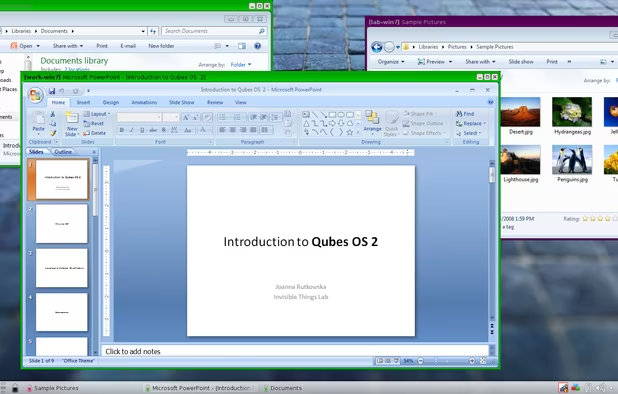
That is surprisingly common issue with Qubes OS. However, I had absolutely no trouble using it for several months. And I have probably cheapest and weakest system ever: i3-2100 on ASRock H61iCafe. The only serious downside of this system is extensive RAM usage. 8Gb I find absolute minimum for true comfort (3 or 4 Linux domains plus 1 Windows HVM domain simultaneously).
I believe Qubes OS to be the most effective and reasonably secure operating system available. It can be a little fiddly to set up and use, but after using Qubes OS, every other operating system feels dangerously unsecure. I do not want my SSH keys, private documents, and photos in the same place a browser runs. Browsers are complex, fallible, vulnerable software, and your privacy and security are only as good as your weakest link.