qscreenshot Alternatives

qscreenshot is described as 'Simple creation and editing of screenshots' and is a screenshot capture tool in the photos & graphics category. There are more than 100 alternatives to qscreenshot for a variety of platforms, including Windows, Mac, Web-based, Linux and Google Chrome apps. The best qscreenshot alternative is ShareX, which is both free and Open Source. Other great apps like qscreenshot are Flameshot, Greenshot, Snipping Tool and ScreenToGif.

Copy a direct link to this comment to your clipboard
qscreenshot alternatives page was last updated

Alternatives list

  1. PrintKey-Pro icon
     1 like

    PrintKey-Pro is a screen capture program that can capture the screen or any part of it with the press of the Print Screen key (or any other key you configure).

    Cost / License

    • Paid
    • Proprietary

    Application type

    Platforms

    • Windows
     
  2. Schirmfoto icon
     1 like

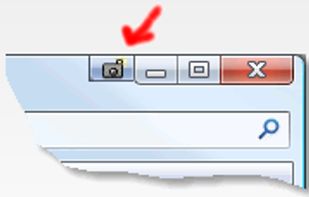
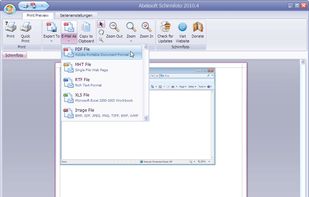
    Schirmfoto is the easiest way of creating screenshots. Schirmfoto integrates itself into your Windows system by adding a new button in the title bar of each window. Clicking this icon will create a screenshot for you.

    Cost / License

    • Freemium
    • Proprietary

    Application type

    Platforms

    • Windows
     
  3. Kioku icon
     1 like

    A capture software suits noobs.

    Cost / License

    • Free
    • Proprietary

    Application type

    Platforms

    • Windows
     
  4. Floomby icon
     1 like

    Take screenshots in one click. Select region and screenshot is ready! Download Floomby for Free.

    Cost / License

    • Free
    • Proprietary

    Application type

    Platforms

    • Windows
     
  5. Abduction icon
     1 like

    Right click on any web page, frame or iframe, click "Save Page As Image..." and then resize the selection around the piece you want to save.

    Cost / License

    • Free
    • Open Source

    Application type

    Alerts

    • Discontinued

    Platforms

    • Mac
    • Windows
    • Linux
    • Firefox
     
  6. FileShuttle icon
     3 likes

    Your screenshots are automatically uploaded on your web storage. The URL is in the pasteboard when the upload is finished. / FileShuttle support FTP and SFTP protocols to upload your files on your own web storage. / Drop a file on the dock icon to upload the file and get the URL.

    Cost / License

    • Free
    • Open Source

    Application type

    Platforms

    • Mac
     
  7. Screenshooter icon
     7 likes

    Simple, but powerful application for taking screenshots, editing them with included editor, and saving using multiple options, such as local storage, cloud, FTP-server, or direct copying to the clipboard or E-mail message.

    Cost / License

    • Free
    • Proprietary

    Application type

    Platforms

    • Windows
     
  8. KSUploader icon
     4 likes

    KSUploader is a instant sharing tool, you can capture screens, upload files or your clipboard.

    Cost / License

    • Free
    • Open Source

    Application type

    Alerts

    • Discontinued

    Platforms

    • Mac
    • Windows
    • Linux
     
  9. Purrint icon
     1 like

    Make your PrintScreen button work the way it ought. Save to file, print to printer, or copy to dumb ol clipboard.

    Cost / License

    • Free
    • Proprietary

    Application type

    Platforms

    • Windows
     
  10. Img.urls icon
     1 like

    img.urls is a simple Imgur uploader. Drag and drop files onto the dock icon or into the application window to upload to Imgur.

    Cost / License

    • Free
    • Proprietary

    Platforms

    • Mac
     
  11.  1 like

    MyImgur is the most handy capture and uploader tool you’ll ever find for Windows computers. Intuitive 1-click actions and simple settings to very quickly capture areas of your screen or specific windows and send them to Imgur for sharing, or select a few files from your computer...

    Cost / License

    • Free
    • Proprietary

    Application type

    Platforms

    • Windows
     
  12. ClipUpload icon
     1 like

    This innovating application adds a new icon in your system tray. Upon single-clicking it with your left mouse button, it will upload whatever is in your clipboard to where you chose it to be.

    Cost / License

    • Free
    • Open Source

    Platforms

    • Windows
     
You are at page 11 of qscreenshot alternatives