PVS-Studio icon
PVS-Studio icon

PVS-Studio

 17 likes

Deep static analysis, direct support from devs| C, C++, C#, Java, JavaScript, TypeScript, Go | Helping you ship calmer releases.
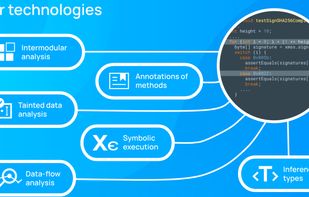
Main mechanisms in PVS-Studio analyzer

Cost / License

  • Paid
  • Proprietary

Since

  • Since 2012

Platforms

  • Windows  PVS-Studio requires at least 2 GB of RAM (4 GB or more is recommended) for each processor core when the analyzer runs on a multi-core system.
  • Mac
  • Linux  PVS-Studio requires at least 2 GB of RAM (4 GB or more is recommended) for each processor core when the analyzer runs on a multi-core system.
  • Visual Studio Code
  • Microsoft Visual Studio  PVS-Studio requires at least 2 GB of RAM (4 GB or more is recommended) for each processor core when the analyzer runs on a multi-core system.
  • GitHub
  • IntelliJ IDEA
  • Unity
  • Qt
  • JetBrains IDE
17likes
0articles
Save

Features

Features

Highlights All activities

PVS-Studio News & Activities

Recent activities

PVS-Studio information

AlternativeTo Categories

Development, Security & Privacy

Our users have written 2 comments and reviews about PVS-Studio, and it has gotten 17 likes.

PVS-Studio was added to AlternativeTo by Andrey_Karpov on and this page was last updated .

Comments and Reviews

   
Code_Analysis
-2

We released the version of PVS-Studio analyzer for Linux. Now Linux developers are getting a new powerful tool to fight bugs in the code. The new Linux version (.deb, .rpm, .tgz) is available for download on the page: http://www.viva64.com/en/pvs-studio-download-linux/

Review from a new or low-activity account — shown here, but not counted in the app rating.
andreykarpov
-2

This is a static code analyzer that can detect a wide range of various bugs. The analyzer may be used both from within the Visual Studio environment and as a standalone application. Among the languages supported by the analyzer are C, C++, C++11, C++/CLI, C++/CX. It provides a functionality that allows one to integrate the analyzer into the development process in a number of ways. For instance, it can be set to automatically analyze recently modified files; it provides support for MSBuild; it also offers a feature to trace compiler launches and collect the information necessary for project analysis.

Article about PVS-Studio: PVS-Studio for Visual C++.

Examples: Updatable List of Open-Source Projects Checked with PVS-Studio.

Review from a new or low-activity account — shown here, but not counted in the app rating.

What is PVS-Studio?

PVS-Studio is a static application security testing (SAST) solution that helps enhance code quality, security, and safety. It detects bugs and potential vulnerabilities in C, C++, C#, Java, JavaScript, TypeScript and Go code on Windows, Linux, and macOS.

Features:

  • Supports various analysis types: intermodular, incremental, data flow analysis, taint analysis;
  • Integrates into cloud platforms;
  • Works offline & on-premise;
  • Provides cross-platform integration;
  • Offers ways to handle false positives;
  • Quick technical support directly from developers;
  • 1200+ diagnostic rules with detailed descriptions and examples;
  • Compliance with safety & security standards: OWASP TOP 10, MISRA C/C++, CWE, SEI CERT;
  • Detailed reports and reminders for developers and managers;
  • Efficiently handles legacy code (baselining of analyzer results);
  • Active support of the Open Source Community, analysis of open-source projects;
  • Integration with popular IDEs, code quality platforms, CI/CD, build systems.
  • Etc. Good option for:
  • game developers (Unity & UE integration included)
  • embedded developers (embedded platform support);
  • DevSecOps experts
  • project managers (code quality platform integration included)
  • FinTech (compliance with OWASP ASVS)
  • mature projects (seamless legacy handling)
  • you!

More on website: pvs-studio.com

PVS-Studio Videos

Show 7 more videos