Purrchiver is a Mac archive utility that archives, compresses, and encrypts — together in one step, or each on its own. It opens and extracts everything else too, RAR, encrypted, and multi-part archives included, without the ads, subscriptions, or tracking that have crept into other archive tools.
FREE TO START
Free to download and complete out of the box: open and extract every supported format, preview any file inside with Quick Look, test an archive's integrity, and batch-extract a folder of archives at once. Creating ZIP, tar, gzip, and bzip2 is free too.
ONE UNLOCK, NO SUBSCRIPTION
A single one-time purchase unlocks the advanced tools, with every future feature included:
- Create 7-Zip, ISO, CPIO, xz, zstd, brotli, lzip, and lz4
- Encrypted ZIP and 7-Zip, age, and encrypted DMG
- Split and multi-volume archives
- Edit archives in place: add or remove files without repacking
- Convert archives, e.g. RAR to 7-Zip or ZIP, or Encrypto's .crypto to AES-256 or age
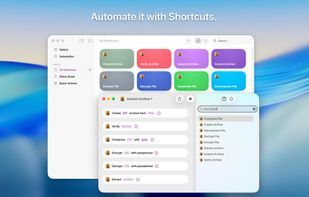
- Batch create and encrypt, custom presets, and Shortcuts, Spotlight, and Siri automation
FAST BY DEFAULT
A multithreaded engine that puts every core to work. Creating a tar.xz is about 5× faster than with the tar built into macOS, at the same size.
RIGHT IN FINDER
Press Space on an archive to preview its contents. Right-click any file or folder to archive, compress, extract, or encrypt it.
BUILT FOR PRIVACY
- No ads, analytics, tracking, or third-party SDKs
- No network access at all; nothing you open leaves your Mac
- App Privacy label: Data Not Collected
- App Sandbox and Hardened Runtime; reads only the files you choose
Made by one person. Email goes directly to me.







 Corey Daley added Purrchiver as alternative to The Unarchiver, 7-Zip, PeaZip, NanaZip and 19 more
 Corey Daley


No comments or reviews, maybe you want to be first?