
Promic Speech AI icon

Promic Speech AI

Windows meeting transcription with local AI for microphones, call windows and recordings. Identify speakers, edit minutes, extract decisions and commitments, query a cited archive, and export DOCX or PDF without sending meeting content to the cloud.
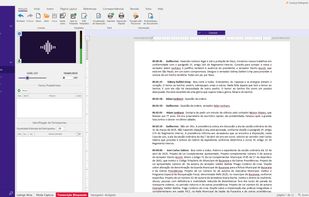
Live transcription from a room microphone: the text appears in the built-in editor, separated by speaker.

Cost / License

  • Subscription
  • Proprietary

Application type

Platforms

  • Windows
0likes
0articles
Save

Features

Properties

Features

Highlights All activities

Promic Speech AI News & Activities

Recent activities

Promic Speech AI information

  • Developed by

    BR flagRiole
  • Licensing

    Proprietary and Commercial product.
  • Pricing

    Subscription ranging between $20 and $99 per month.
  • Alternatives

    8 alternatives listed
  • Badge

    Get an embeddable badge for Promic Speech AI
  • Supported Languages

    • English
    • Portuguese
    • Spanish

AlternativeTo Categories

Office & Productivity, Audio & Music
Promic Speech AI was added to AlternativeTo by guimoro on and this page was last updated .

No comments or reviews, maybe you want to be first?

What is Promic Speech AI?

Promic Speech AI is a Windows application for documenting meetings with AI that runs on the user's own workstation. It transcribes in-person meetings from a room microphone or USB audio interface, captures audio from a selected call window (Teams, Zoom, Meet) without adding a bot to the meeting, and also processes recorded audio and video files.

Speech is separated by voice, so you can rename participants, correct assignments and keep the voices of frequent participants. A local language model drafts summaries in styles such as executive minutes, detailed, action-focused or chronological, and the reviewed document can be exported as DOCX or PDF. With fact analysis enabled, the app suggests decisions, disagreements and commitments, and a chat answers questions about past meetings with references to the source meeting.

In the Professional edition, transcription, summaries and the meeting archive stay on the Windows workstation: meeting content is not sent to a cloud AI service or to the developer. License activation and model downloads use the internet. There is no transcription-hour quota and no per-token charge.

Requirements: 64-bit Windows and an NVIDIA RTX GPU with at least 8 GB of VRAM. Professional is a monthly subscription per workstation with a free 15-day trial. Enterprise (shared archive with users, groups and permissions) and Government editions are offered by proposal.
