
Progress Bar Timer icon

Progress Bar Timer

 Like

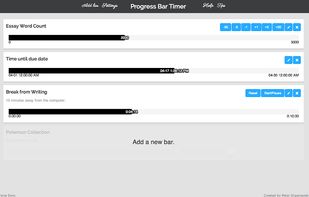
This app allows you to create general purpose progress bars. Progress bars are useful for tracking various types of progress. This app allows you to create three: Counter,Clock and Timer.
Progress Bar Timer screenshot 1

Cost / License

  • Free
  • Proprietary

Since

  • Since 2017

Platforms

  • Windows
  • Mac
  • Linux
  • Chrome OS
  • Google Chrome
0likes
0articles
Save

Features

Features

Highlights All activities

Progress Bar Timer News & Activities

Recent activities

No activities found.

Progress Bar Timer information

AlternativeTo Categories

Office & Productivity, Web Browsers

Popular alternatives

    View all

    Our users have written 1 comment or review about Progress Bar Timer, and it has gotten 0 likes.

    Progress Bar Timer was added to AlternativeTo by lippyshot on and this page was last updated .

    Comments and Reviews

       
    0

    No download at Chrome Store. "Chrome apps will no longer be supported in the future" message.

    What is Progress Bar Timer?

    This app allows you to create general purpose progress bars. Progress bars are useful for tracking various types of progress. This app allows you to create three:

    • Counter: A counter bar is an efficient to see how far you are between two numbers. Maybe you're counting days, or weight loss, or paper word count. With a counter, you manually set what the current progress is.

    • Clock:A clock bar counter shows the progress between two dates and times. If you'd like to track how far along you are in your workday or how much of a season has passed, a clock timer can show you.

    • Timer:A timer bar functions like an egg timer: you set how long you want it to run for, and it shows the time progress toward that goal.

    Give it a try!