

Polido icon
Polido icon

Polido

 Like

Polido is an AI prompt helper and message rewriter that works in place, in any app. A rough prompt for ChatGPT, Claude or Gemini becomes a better one, and Slack messages and emails say what you mean.
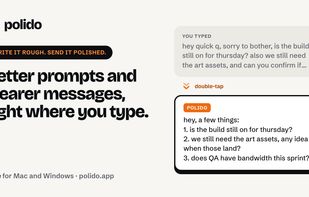
Polido screenshot 1

Cost / License

  • Freemium (Subscription)
  • Proprietary

Since

  • New

Platforms

  • Windows
  • Mac
0likes
0articles
Save
Highlights All activities

Polido News & Activities

Recent activities

Polido information

  • Developed by

    PT flagVolt Games, Lda.
  • Licensing

    Proprietary and Freemium product.
  • Pricing

    Subscription ranging between $8 and $60 per month + free version with limited functionality.
  • Alternatives

    7 alternatives listed
  • Badge

    Get an embeddable badge for Polido
  • Supported Languages

    • English

AlternativeTo Category

AI Tools & Services
Polido was added to AlternativeTo by Paul on and this page was last updated .

No comments or reviews, maybe you want to be first?

Official Links

What is Polido?

Polido is an AI prompt helper and message rewriter that works in place, in any app. A rough prompt for ChatGPT, Claude or Gemini becomes a better one, and Slack messages and emails say what you mean. Free for Mac and Windows.

One key, wherever you type

Polido knows where you are typing before it writes a word: which app you are in, and which site is in your address bar when that app is a browser. A prompt gets the constraints it was missing. A message gets shorter.

Works in any app

  • Select it, and Rewrite appears: Select text anywhere and a small Rewrite button appears at the end of it. Click it, or double-tap, and only what you selected is rewritten; the rest of the field is left exactly as it was.
  • Try again, from your own words: Every retry starts from what you wrote, never from the last rewrite. Double-tap again, or press 1, 2 or 3 for Casual, Neutral or Formal, and you are one keystroke from where you started.
  • Tab to say what you actually wanted: Type an instruction, “much shorter”, “add examples”, “be blunt”, and press Return. Your caret never leaves your own field: the typing is read through the event tap, not by stealing focus.