plat.plus is a modern, polished platform for teaching and learning. Course pages, tasks with feedback and grading, live questions, video meetings with recordings, real-time co-writing, files, a calendar and messages all come together in one calm interface that works just as well on a phone as on a laptop.
Easy for everyone. Participants join a course with a link or a QR code and sign in without a password. Anyone can answer a live question by entering a short code, no account needed. plat.plus installs as an app on any device, and the app keeps course content you've opened available offline.
Flexible course pages. There is no fixed structure: lecturers build each course page from blocks (text, materials, tasks, headings, embeds) in a visual editor, and a new course starts almost empty rather than with a wall of menus.
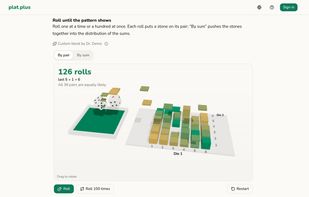
Custom Blocks. When no existing block fits, lecturers can create their own. They copy a ready-made prompt into any AI chat they like, including local models, and paste the generated code back in: flashcards, quiz games, simulations or interactive 3D models. plat.plus itself never sends anything to an AI. Each Custom Block runs isolated from the rest of the page and saves every learner's answers and progress to their account. Results reach the lecturer under a pseudonym unless the lecturer chooses to show names, and learners are told which before they answer. Lecturers keep their blocks in a personal collection and can reuse them in any course.
A live Markdown editor in every text field. Formatting appears as you type: headings, lists, tables, links and LaTeX formulas are rendered right where you write them, so there's no need to switch to a preview. Pasted Markdown is formatted instantly, and pasting a URL over selected text turns it into a link.
Plat+Pad for writing together. Several people can write in the same document at once and see each other's cursors, with names and photos. Earlier versions can be restored, and any Pad can be downloaded as Markdown.
Live interaction, in the lecture hall or online. In a Live Room, participants answer spontaneous or prepared questions on their phones (multiple choice, yes/no, numbers, free text or word clouds), and the results appear live on the projector and in video meetings. Meetings have a waiting room, raised hands and reactions. Recordings capture only the host's screen, camera and voice, and are automatically split into chapters at each slide change.
Open and private. Text is stored as Markdown and formulas as LaTeX, and the course calendar can be subscribed to from any calendar app. No tracking, no ads. Users can connect their own AI assistant via MCP, and it sees only what they themselves are allowed to see.
For everyone who teaches or learns: universities, tutoring, workshops and study groups.






 EU




 plat.plus


No comments or reviews, maybe you want to be first?