
Pixlift icon
Pixlift icon

Pixlift

 Like

Free, open source screenshot and screen recording app for Mac. One keyboard shortcut each for an area, a window, the whole screen and a recording with sound; each capture is saved, copied to the clipboard, or both.
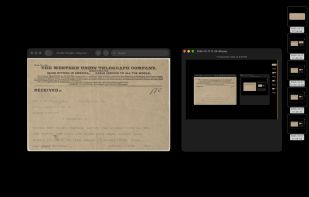
The Wright brothers’ telegram of 17 December 1903 in Preview. Option-Command-7 took an area of it, and the note got the capture from the clipboard; then Option-Command-9 took the whole screen four times, each pasted over the last. Every capture is also saved to the Desktop, named by the time it was taken.

Cost / License

  • Free
  • Open Source (MIT)

Since

  • New

Updated

  • Updated Nov 2026

Platforms

  • Mac  Apple silicon, macOS 13 or later
0likes
0articles
Save

Features

Properties

Features

Highlights All activities

Pixlift News & Activities

Recent activities

Pixlift information

AlternativeTo Category

Photos & Graphics

GitHub repository

  •  1 Star
  •  0 Forks
  •  0 Open Issues
  •   Updated  
View on GitHub

Popular alternatives

View all
Pixlift was added to AlternativeTo by Herman Harazha on and this page was last updated .

No comments or reviews, maybe you want to be first?

Official Links

What is Pixlift?

Option-Command-7 takes a selected area, Option-Command-8 a selected window without its shadow, Option-Command-9 the whole screen, and Option-Command-0 starts and stops a recording of the whole screen with the Mac's sound and the microphone. Two more shortcuts copy the text of any area of the screen (OCR by Apple's Vision, QR codes too) and the color of any pixel as a HEX code. Every shortcut can be changed in the window.

Where captures go is set apart for screenshots and recordings: Save to the Desktop, any folder or None, and Clipboard on or off; one of the two always stays on. Files are named by the time they were taken. On the clipboard a screenshot is both the file and the picture, so an app that takes files and an app that takes pictures each get what it takes.

Screenshots are made by macOS's own screencapture: PNG with the display's own pixels and color profile. Recordings are MP4: H.264 at the display's resolution, a variable frame rate up to its refresh rate, AAC sound in one track. No editor, no history, no cloud; nothing in the Dock or the menu bar. Everything runs offline; the only network call is a daily update check. Native Swift, Apple silicon, macOS 13 or later, MIT license.
