


Penpot
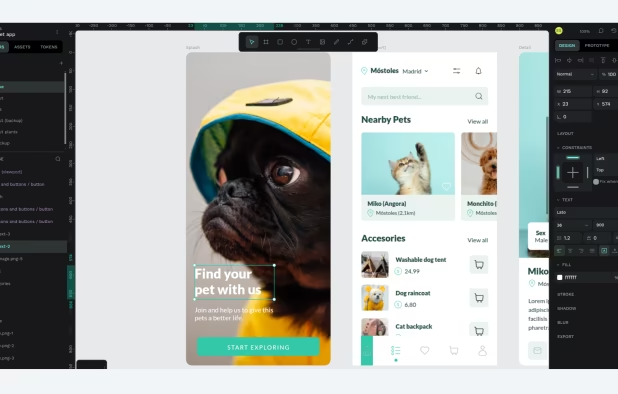
Open-source design platform offering web-based and self-hosted workflows, code inspection in HTML and CSS, adaptive layouts with CSS Grid and Flex, real-time collaboration, auto layout features, reusable components, design tokens, layer support, plugins, and no tracking.
Cost / License
- Freemium (Subscription)
- Open Source (MPL-2.0)
Application types
 EU
EUPlatforms
- Online
- Self-Hosted


Features
Properties
- Lightweight
Features
- UI Design
- Prototyping
- UX Design
- Real time collaboration
- Ad-free
- Cloud Sync
- Dark Mode
- Create UI Components
- Interactive Prototyping
- No Coding Required
- Support for Layers
- Color Picker
- Design handoff
- Live Preview
- Self-hosted
- Extensible by Plugins/Extensions
- Auto Layout
- Design System
- Wireframing
- No Tracking
- Built-in Color Picker
- Works Offline
- AI-Powered
- API Integration
Penpot News & Activities
Recent News
- Fla published news article about Penpot
 Penpot 2.13 update: box shadow tokens, improved i18n, and enhanced file management
Penpot 2.13 introduces box shadow tokens, allowing users to apply customizable shadow styles. i18n ...
- POX published news article about Inkscape
 Beyond Adobe's pricey products: my graphic designer’s toolbox on Linux
I've spent years polishing my craft with Adobe’s heavyweight suite, Photoshop, Illustrator, InDesig...
- Fla published news article about Penpot
 Penpot 2.10 introduces Variants for components and new design tokens
Penpot 2.10 introduces Variants, a feature that lets users group similar components, such as button...


Recent activities
- penpot updated Penpot
- vemorith liked Penpot
 ResumeCraft added Penpot as alternative to ResumeCraft
- holybreadman liked Penpot

Featured in Lists

There is no doubt that Adobe Suite is great, even in some case it's probably the best. But you can be mad …
Selfhosting is where you're hosting your own websites, apps, software, tools, and much more on your own server …

Ever wondering about free great open source software to start your idea? Here's a list for you to get started.
What is Penpot?
Penpot is the open-source design platform for teams that build digital products at scale.
Web-based or self-hosted, and built on open web standards (SVG, CSS, and HTML), Penpot gives teams full ownership of their files, avoiding vendor lock-in and enabling transparency, sovereignty, and long-term flexibility.
Designers, developers, and AI agents can work together to create:
- stunning visuals
- interactive prototypes
- scalable design systems with native Design Tokens, Components, and Variants
- ready-to-use code
Penpot turns design into code-readable artifacts that integrate directly with development and AI workflows—helping teams ship products faster. Its open, world-class plugin API and MCP server enable teams to extend functionality, integrate with their stack, and build complex design infrastructures.
Product teams can scale design systems natively as a source of truth; keeping design and code in sync through Design Tokens, reusable Components, and Variants—fully integrated into modern, AI-driven workflows.
Penpot is free for all users. For enterprise and large teams needing advanced capabilities and premium support, explore pricing:
Enjoy the power of full-stack design in one platform.
Penpot Videos
Penpot information
Developed by
 Kaleidos
 Licensing
Open Source (MPL-2.0) and Freemium product.Pricing
Subscription ranging between $7 and $950 per month + free version with limited functionality.Rating
Average rating of 4.7Alternatives
71 alternatives listedNews
12 news article related to PenpotSupported Languages
- English
- French
- Spanish
- German
- Indonesian
- Portuguese
- Polish
- Hebrew
- Russian
- Arabic
- Croatian
- Turkish
- Chinese
- Persian
AlternativeTo Categories
Photos & Graphics, Development, Network & AdminGitHub repository
- 45,251 Stars
- 2,659 Forks
- 584 Open Issues
- Updated


Comments and Reviews
Penpot is really intuitive: I never used such kind of application but managed to quickly prepare an interactive set of mock-ups of a mobile app feature. Particularly the creation of components (groups of elements) and the editing of one specific instance of such component is really convenient (as well as the updating of instances with the latest version of the master component). Big plus also that it's open source and free for everyone to use.
Unfortunately it's raw as a butchered chicken at the moment; the functionality may be good but the user experience is just awful. Freezes when working with images, editing paths is unintuitive, undo/redo changes random stuff, shapes jump and twist when moving/transforming them, and everything has sooo much friction. And SVG code exported is too complex for a regular shape with an outline. Shortly, it's riddled with tiny bugs, and covered in questionable hotkey choices. Fun to look at, rage-inducing when you actually use it.
Sadly no Android & ios support. Working on mobile devices deals with PC native fronted. Also i am missing some workflow visualization like automatically attaching arrows of views for schematic design. The Setup was pretty tricky, using Podman. but worked after some github issue research. Rich templates are are fine feature. But i still miss default notion like Markdown Notes support. Would be a great nice feature - and would lead up penpot more into the merge of Figma & Miro boards with LogSeq - like AFFinE.
The dev actively collaborate with active FOSS project to get actual feedback, like the current colaboration with KDE Visual Design Group community.
Although I'm not a designer i can say this app is very good. Ive used it in some designs and it was a bit difficult, but its easy to learn
Give it a try! Easy to use, intuitive interface, FOSS, European.
It's like an open source figma, which is needed because figma is starting to become more like adobe.