

Penguin Mail icon
Penguin Mail icon

Penguin Mail

Mail and calendar for Linux. Gmail and IMAP accounts, Google Calendar, contacts, OpenPGP and S/MIME. GTK4 and libadwaita, written in Rust.
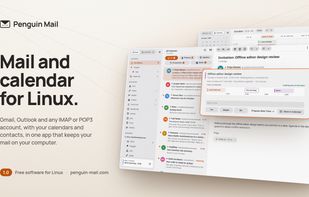
Penguin Mail screenshot 1

Cost / License

Application type

Platforms

  • Linux
  • Snapcraft
1like
0articles
Save

Features

Properties

  1.  Privacy focused

Integrations

  1.  Calendar
  2. Microsoft Outlook icon  Microsoft Outlook
  3. Yahoo! Search icon  Yahoo
  4. Google Calendar icon  Google Calendar

Features

  1.  Works Offline
  2.  No Tracking
  3.  Unified inbox
  4. Google Calendar icon  Sync with Google Calendar
  5.  No registration required
  6.  GPG Encryption
  7.  Dark Mode
  8.  Ad-free
  9.  OpenPGP
  10.  Gtk
  11.  Contacts
  12.  CardDAV Support
  13.  POP3 Support
  14.  Sync with iCloud
  15.  Calendar Sync
  16.  IMAP Support
  17.  CalDAV Support
  18.  SMTP Support
  19.  Built-in AI Assistant
  20.  S/MIME Support

Penguin Mail News & Activities

Highlights All activities

Recent activities

Penguin Mail information

AlternativeTo Categories

Office & Productivity, Security & Privacy, Backup & Sync, AI Tools & Services

GitHub repository

  •  217 Stars
  •  5 Forks
  •  4 Open Issues
  •   Updated  
View on GitHub
Penguin Mail was added to AlternativeTo by Paul on and this page was last updated .

No comments or reviews, maybe you want to be first?

What is Penguin Mail?

Penguin Mail is mail and calendar for Linux. It reads Gmail accounts, Microsoft accounts (Outlook.com, Hotmail, Live and Microsoft 365) and any IMAP and SMTP account, such as Fastmail, iCloud and Yahoo, and finds the server settings for you. It syncs from the system tray, shows your accounts in one inbox or one at a time, and keeps your mail on your own computer. Gmail and Google Calendar accounts talk to Google directly, and Microsoft accounts talk to Microsoft Graph, so no other server sees your mail.

It is built with GTK and libadwaita and fits best on GNOME. It runs on any Linux desktop, and the tray icon and every other feature work outside GNOME.

What it does:

  • Gmail, Microsoft, IMAP and POP3 accounts: Sign in to Gmail, to Outlook.com, Hotmail, Live or Microsoft 365, or to Fastmail, iCloud, Yahoo or any IMAP, POP3 and SMTP server. Penguin Mail finds the server settings from your address.
  • One inbox, synced from the tray: Read every account in one inbox or one at a time. Penguin Mail keeps syncing from the system tray, with an unread count and notifications you can act on.
  • Your calendar: Day, Week, Month and Agenda views of every calendar on every account: Google, Microsoft, and CalDAV where your provider offers it. Answer an invitation from the message it came in.
  • Contacts: Your contacts from Google, Microsoft, or CardDAV where your provider offers it, and suggestions from the people you write to as you type a recipient.
  • OpenPGP and S/MIME: Sign and encrypt through your own GnuPG. Penguin Mail never holds your keys or asks for a passphrase.
  • Rules: Gmail filters, Microsoft inbox rules, and Sieve rules where your provider offers them, listed in plain words, with a form to add one.
  • An optional assistant: Off until you choose a model. It can run on your own computer, through LM Studio or Ollama, and it asks before it sends mail or changes a setting.