Pengrid icon
Pengrid icon

Pengrid

 Like

Desktop publishing for reports, proposals and newsletters, with text that flows through reusable page layouts and flags overflow using the real font. Import editable PDFs, save brand systems, build charts, update contents pages, collaborate live, translate designs and export to PDF, HTML, Figma or Markdown.
Pengrid screenshot 1

Cost / License

  • Freemium (Subscription)
  • Proprietary

Since

  • New

Platforms

  • Windows
  • Mac
  • Linux
0likes
0articles
Save

Features

Features

Highlights All activities

Pengrid News & Activities

Recent activities

Pengrid information

  • Developed by

    SE flagPengrid
  • Licensing

    Proprietary and Freemium product.
  • Pricing

    Subscription that costs $6 per month + free version with limited functionality.
  • Alternatives

    12 alternatives listed
  • Badge

    Get an embeddable badge for Pengrid
  • Supported Languages

    • English

AlternativeTo Categories

Office & Productivity, AI Tools & Services

Popular alternatives

View all
Pengrid was added to AlternativeTo by Pengrid on and this page was last updated .

No comments or reviews, maybe you want to be first?

What is Pengrid?

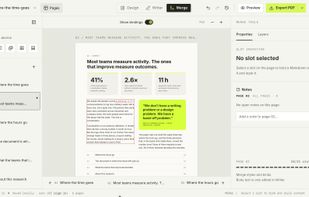
Pengrid is a desktop application for creating and updating designed documents, including annual and impact reports, proposals, white papers, position papers, and newsletters. It links document text to page design, reflowing content into designed pages as text changes. The application measures text using the document's fonts and flags layout boxes where content no longer fits.

PDFs, including reports or newsletters exported from Microsoft Publisher, can be imported as editable documents with their text, layout, fonts, colours, and images. Brands can store colours, fonts, logos, page templates, and chart styles. Pengrid can generate charts from supplied data, update tables of contents, apply shared headers, footers, and page numbers, and reuse a design for translations.

Pengrid supports live collaborative editing and exports to print-ready PDF, HTML, Figma, and Markdown. Its writing assistant can run locally or use an existing AI service, while AI agents can work in documents through MCP. It is free for one person and does not require an account.