Peekabop icon
Peekabop icon

Peekabop

 Like

Shows lyrics in time with the current track from Spotify, Apple Music, YouTube and other browser players. Words can highlight individually in a notch display, floating pill, bottom subtitles or full-screen sing-along view; it can adjust music-video timing on-device.
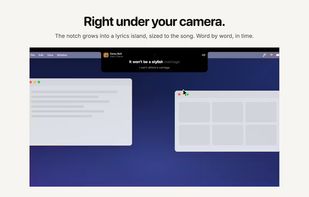
Peekabop screenshot 1

Cost / License

  • Pay once
  • Proprietary

Since

  • New

Platforms

  • Mac
0likes
0articles
Save

Features

Features

Highlights All activities

Peekabop News & Activities

Recent activities

Peekabop information

AlternativeTo Category

Audio & Music
Peekabop was added to AlternativeTo by plop on and this page was last updated .

No comments or reviews, maybe you want to be first?

Official Links

What is Peekabop?

Peekabop is a menu bar app for macOS that shows the lyrics of whatever you're listening to, in time with the music. It works with Spotify, Apple Music, and YouTube or other music sites in any browser, so you don't need to keep a player window open to follow along.

Lyrics light up word by word as the song plays, and you choose where they appear:

Around the MacBook notch In a small floating pill that stays above your other windows As subtitles at the bottom of the screen Full screen, for singing along

Lyrics come from lrc.red and LRCLIB, and many songs are timed word by word. For music videos in the browser, Peekabop can line the lyrics up with the video by listening to the Mac's audio on-device (macOS 26). It never uses the microphone.

Privacy first: no account and no analytics. The only thing sent out is the song's title, artist, album and length, to look up the lyrics.

Requires macOS 15 or later.