PDF TBox icon
PDF TBox icon

PDF TBox

The main purpose of the app is to provide a fully offline, privacy-focused toolkit for editing, converting, and managing PDF files directly on your device without uploading or tracking data.

PDF TBox screenshot 1
PDF TBox screenshot 2
+5
PDF TBox screenshot 3

Cost / License

  • Pay once
  • Proprietary

Platforms

  • Android
1like
0articles
Save

Features

Properties

Features

Highlights All activities

PDF TBox News & Activities

Recent activities

PDF TBox information

  • Developed by

    NL flagElixDev
  • Licensing

    Proprietary and Commercial product.
  • Pricing

    One time purchase (perpetual license) ranging between $2 and $3.
  • Alternatives

    2 alternatives listed
  • Badge

    Get an embeddable badge for PDF TBox
  • Supported Languages

    • English
PDF TBox was added to AlternativeTo by ElixDev on and this page was last updated .

No comments or reviews, maybe you want to be first?

Official Links

What is PDF TBox?

Most PDF apps upload your files to a server, require an account, or track usage. PDF TBox does none of that. All tools run directly on your device — no uploads, no accounts, no tracking, and no data collection of any kind.

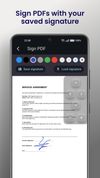
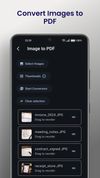
Key features: • Add Signature – Create and reuse multiple signatures stored only on your device • Merge PDFs – Combine full documents or selected pages with drag-and-drop page ordering • Split PDF – Extract or separate pages into new files • PDF to Image – Convert all or selected pages to images • Image to PDF – Convert images with drag-and-drop page ordering • Text to PDF – Create PDFs from plain text files • Add/Remove Password – Secure or unlock your documents • 100% offline – Your files never leave your phone

Privacy first. Speed second. Full control always.

PDF TBox Videos