


PDF Reader Pro
Read, edit, annotate, and sign PDF documents with built-in AI features like summarize and translate, OCR in 50+ languages, fill forms, export to major formats offline, apply watermarks, compress files, secure with passwords, and use text-to-speech on all major platforms.
Cost / License
- Freemium (Pay once or Subscription)
- Proprietary
Application types
Platforms
- Mac
- Windows
- Android
- iPhone
- Android Tablet
- iPad


Features
- OCR
- Combine PDF
- Fill PDF Forms
- Split PDF files
- PDF annotation
- Sign PDF files
- PDF compression
- Text to Speech
- PDF encryption
- Split and merge PDF files
- Bates number
- Convert PDF to Powerpoint
- Create fillable PDF Forms
- Export to PDF
- Convert PDF to Text
- Form Builder
- JPG to PDF Conversion
- Create PDF files
- Convert PDF to Word document
- Convert PDF to HTML
- Convert images to PDF
- PDF to PPT
- Bates numbering
- Password protection
- PDF OCR
- Convert PDF to image
- Convert PDF to Excel document
PDF Reader Pro News & Activities
Recent News
Recent activities
 BerkerGungor added PDF Reader Pro as alternative to ZapPDF
 drawing777 added PDF Reader Pro as alternative to PDF Dark Mode
 kikyoh-choh added PDF Reader Pro as alternative to ShelfStream
 PDFHouse added PDF Reader Pro as alternative to PDF House
 kodekenobi added PDF Reader Pro as alternative to Trevnoctilla
 soid added PDF Reader Pro as alternative to PDF Owl
- ucopmok liked PDF Reader Pro
- Fla updated PDF Reader Pro
 Danilo_Venom added PDF Reader Pro as alternative to Google PDF Viewer
 jdakfkj333 added PDF Reader Pro as alternative to Minimal eReader




PDF Reader Pro information
Developed by
 Kdan Mobile Software LTD
 Licensing
Proprietary and Freemium product.Pricing
One time purchase ranging between $50 and $100, and / or subscription ranging between $2 and $6 per month + free version with limited functionality.Alternatives
78 alternatives listedSupported Languages
- English
- Czech
- French
- German
- Italian
- Japanese
- Korean
- Portuguese
- Russian
- Chinese
- Spanish
- Thai
AlternativeTo Categories
Office & Productivity, Photos & GraphicsApple AppStore
- Updated
- 4.43 avg rating


What is PDF Reader Pro?
What is PDF Technologies?
PDF Technologies’ story starts with 2014, is a leading software provider of affordable, secure Out-of-Box PDF solutions on desktop, mobile and online tools. SMBs, IT service and knowledge workers increase their productivity by using PDF Reader Pro to make workflow smarter.
Join the 200M users who are working with PDF Reader Pro on their devices for Reading, Editing, Annotating, Form Fill, Converting, Creating, OCR, and signing PDFs. As the best alternative to Adobe® PDF solution, PDF Reader Pro is a PDF powerhouse that will fulfill all your document needs. We offer free Trial and education plans, as well as PDF Technologies’ Software Development Kits (ComPDFkit/SDKs) to help developers reduce costs and improve productivity by integrating industry-leading PDF technologies into application workflows. Welcome to try.
PDF Technologies' Vision:
PDF Technologies loves to share an out-of-box PDF solution that can promote work smarter to any possible partners.
- Partnership Program: https://www.pdfreaderpro.com/partner
- Volume Licensing Program: https://www.pdfreaderpro.com/vpp-purchase-program
To learn more about PDF Technologies:
- Facebook: https://www.facebook.com/PDFProApp
- LinkedIn: https://www.linkedin.com/company/pdf-reader-pro/
What is PDF Reader Pro?
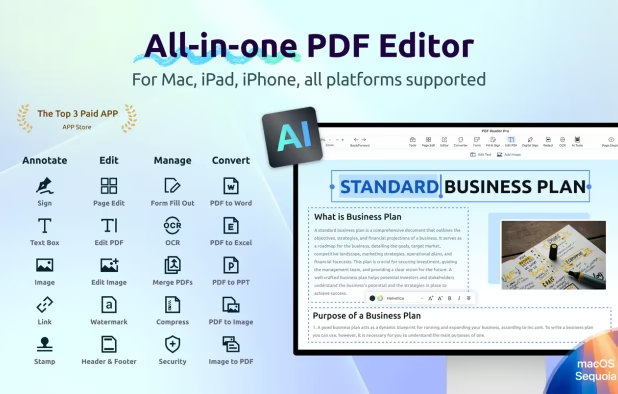
AI FUNCTION · AI Summarize, AI Translate, AI Proofread, AI Rewrite (mac Only)
READ · Reading modes, Multi-tab viewing, Night mode, Presentation · Create and Edit outlines / Bookmark
ANNOTATE ·Classic tools - Annotate your PDF with highlight, note, freehand, text box, note and etc. ·Link - Add hyperlinks to redirect other destinations ·Sign - Create multiple signatures for any situations ·Stamps - Customize your PDF with custom, image and dynamic stamps ·Table · Measure - Annotate dimensions like distance, perimeters, and areas (Windows only)
Fill FORMS ·Create & Edit & Fill Forms
CONVERT · Export from PDF to Microsoft Word (.docx), PowerPoint (.pptx), Excel (.xlsx), RTF, HTML, Text, Image, CSV, and more Offline · Convert to PDF from images imported from Scanner and TXT files
PAGE EDITOR · Merge, Split, Extract, Append, Rotate, delete, replace, and crop pages
PDFS EDITING · Watermark - Add fantastic watermarks to keep your documents safe and professional. · Bates number & Header & Footer - Label each page of your PDF document with fully customized page numbers. · Background - Change the background of the PDFs · Flatten, Booklet, Poster, Multiple
OCR · Convert scanned PDF or images into PDFs or TXT files. 50+ languages supported
DIGITAL SIGNATURE · Ensure document authenticity and integrity with digital signature
SECURE FILES · You can also password protect sensitive pdf
COMPRESS ·Reduce PDF size
Text-to-Speech · Select a passage or document to be read aloud by the TTS engine
Free Trial https://www.pdfreaderpro.com/help/differences-between-free-and-edition-version
All Products https://www.pdfreaderpro.com/product




Comments and Reviews
It's useful a tool for PDF files.