PDF Professional icon

PDF Professional

PDF Professional is a feature-rich PDF solution for reading, annotating, form-filling, editing, signing, converting PDFs on your Mac, iPhone and iPad.
PDF Professional screenshot 1

Cost / License

  • Freemium (Pay once)
  • Proprietary

Application type

Platforms

  • Mac
  • iPhone
  • iPad
3likes
0articles
Save

Features

Features

Highlights All activities

PDF Professional News & Activities

Recent activities

PDF Professional information

  • Developed by

    US flagBuild to Connect, Inc.
  • Licensing

    Proprietary and Freemium product.
  • Pricing

    One time purchase (perpetual license) + free version with limited functionality.
  • Alternatives

    40 alternatives listed
  • Badge

    Get an embeddable badge for PDF Professional
  • Supported Languages

    • English
    • French
    • German
    • Italian
    • Japanese
    • Portuguese
    • Chinese
    • Spanish

AlternativeTo Categories

Office & Productivity, Photos & Graphics

Apple AppStore

  •   Updated 
  •   4.47 avg rating
View in AppStore
PDF Professional was added to AlternativeTo by chen Catherine on and this page was last updated .

No comments or reviews, maybe you want to be first?

What is PDF Professional?

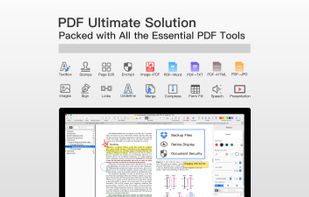
PDF Professional Suite is a full-featured PDF document expert that transforms your Mac into a powerful PDF Office. PDF Professional Suite is a one-stop shop for your Adobe Acrobat PDF document needs. This app provides a complete array of functions to help annotate, view, fill form, sign, edit, bookmark, outline, merge, split, compress and convert your PDFs into Word/HTML/TXT/Png/Jpg files

Packed with all the essential PDF tools, PDF Professional for Expert is your last PDF application you would ever need.

Reading

  • Reading modes - Multi-tab viewing, full-screen, auto flow
  • Presentation - Slideshow Mode to present your PDF as PPT.
  • Create and Edit outlines / bookmarks
  • Night mode
  • TTS (Text-to-Speech)

Annotation

  • Annotate PDFs with highlight, underline, text box, images, and so much more
  • Link - Add hyperlinks to PDFs : Page Number/URL/Email.
  • Stamps - Able to customize stamps comprised of text and image
  • Sign - Create multiple signatures for any situations with trackpad, keyboard or images.

Form-Filling

  • Fill out any Adobe Acrobat PDF forms with interactive fields such as text fields, checkboxes and etc.

PDF Page Editor

  • Merge - combine multiple files into one document
  • Split - Split files based on desired number of pages or files
  • Extract - Extract the desired pages to create a new PDF
  • Insert - Insert another file into the existing file
  • Rotate, delete, replace, and crop pages
  • PDF Compressor
  • Security

Page Sizing & Handling

  • Booklet - Booklet puts your pages side by side re-sorted for booklet printing
  • Poster - Poster divide large PDF page(s) into multiple smaller Pages
  • Multiple - You can print more than one page of a PDF on a single sheet of paper

PDF Convertor

  • Export PDFs to iWork, MS Word, Text, JPG, PNG and HTML
  • Support to convert Word, Pages, Docs into PDF
  • Directly transform images imported from scanner or iOS device to PDF