PDF Prep is a free, open-source desktop tool for combining PDFs and photos into one new PDF. It works locally on Windows and Linux x64, without document uploads, accounts, telemetry, imposed watermarks or paid feature gates.
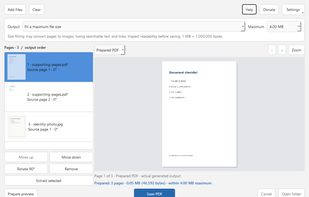
Add PDF, JPEG or PNG files, review page thumbnails and source filenames, then reorder, rotate or remove pages. You can also prepare only selected pages. Generate a preview to inspect the actual result and file size before saving.
An optional maximum size uses decimal megabytes. Original-quality preparation preserves PDF page content and searchable text where possible. If size reduction is needed, fit-to-limit preparation can turn pages into JPEG images, losing searchable and selectable text, links, layers and interactive features. Check readability before saving.
A size target cannot always be met. Encrypted or malformed PDFs and PDFs containing forms or signatures are refused. This is a page assembly and upload-preparation tool, not an OCR, form-editing or redaction tool. It does not remove sensitive information visible on a page.
Saving creates a new PDF and refuses existing destinations, preserving source files. Windows ZIP and Linux AppImage or portable archive packages include Python. Packages are unsigned; Linux requires compatible desktop libraries. Donations are optional.




 Steady-State-Studio added PDF Prep as alternative to PDF Arranger



No comments or reviews, maybe you want to be first?