Past Perfect is a private, non-destructive photo editor for scans, family photos and everyday images.
Restore faces, remove backgrounds, adjust light and color, create custom looks and process entire folders using reusable profiles — all directly on your Mac.
RESTORE FACES
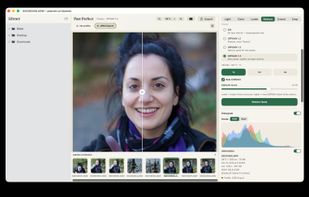
Bring detail back to old, small or damaged portraits with AI-powered face restoration.
Past Perfect includes three GFPGAN models with different restoration characteristics, so you can compare results and choose the version that works best for each photo.
Face restoration can be combined with denoising, cleanup and optional 2× or 4× upscaling.
REMOVE BACKGROUNDS
Remove backgrounds directly on your Mac using Apple Vision.
No uploading, no account and no online service required. Export as PNG to preserve transparency.
EDIT LIGHT AND COLOR
Adjust exposure, contrast, highlights, shadows, black and white points, temperature, tint, saturation, vibrance, clarity, sharpness and noise.
Automatic Improve can analyze a photo and suggest useful starting values while keeping every adjustment editable.
The Color Mixer lets you control hue, saturation and brightness across eight individual color ranges.
LOOKS AND LUTS
Apply built-in color, black-and-white and dithering looks and control their strength.
Import your own LUT files for custom color styles, and add finishing touches with vignettes and frames.
BATCH PROCESSING AND PROFILES
Create reusable profiles that combine editing steps and export settings.
Profiles can include restoration, denoising, automatic corrections, crop, rotation, fixed output sizes, looks, vignettes, file formats, destination folders and naming rules.
Apply a profile to an entire folder and let Past Perfect process the images one by one.
CLEAN UP SCANNED PHOTOS
Optional restoration tools can reduce noise, dust and scratches before face restoration. Each processing step can be enabled independently.
NON-DESTRUCTIVE EDITING
Your edits are saved automatically while the original image is preserved. The finished image is only created when you export.
Past Perfect also supports common Camera RAW formats including ARW, NEF, DNG, CR2 and CR3.
PRIVATE BY DESIGN
Your photos stay on your Mac.
Face restoration, background removal, editing and batch processing all run locally on your device.
No cloud upload. No account required.
Past Perfect helps you edit, restore and process photos efficiently — from a single background removal to an entire folder of family photos.






 EU
EU


 Marco-Wilka added Past Perfect as alternative to Topaz Photo, Pixelmator, Luminar Neo, Photoscape and 7 more


 Marco Wilka


No comments or reviews, maybe you want to be first?