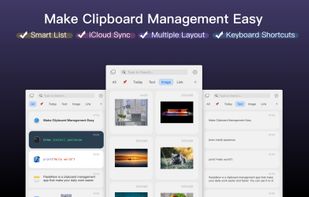
Minimal, native clipboard manager for macOS — one-time purchase, cross-type history (text, code, images, files), and instant search.


PastePal is described as 'Native macOS application that allows us to easily manage pasteboard history, notes and shortcut' and is a clipboard manager in the office & productivity category. There are more than 100 alternatives to PastePal for a variety of platforms, including Mac, Windows, Linux, iPhone and iPad apps. The best PastePal alternative is CopyQ, which is both free and Open Source. Other great apps like PastePal are Ditto, Rememory, PasteBar and Planck.
Minimal, native clipboard manager for macOS — one-time purchase, cross-type history (text, code, images, files), and instant search.


GTK3-based GUI for Senan Kelly's Cliphist. It provides access to previously copied items, as well as management of the clipboard history from a window opened on gtk-layer-shell.


Copy-paste nicely styled text to apps like GMail and Google Docs without learning new shortcuts.


Notes & Clipboard History for Dynamic Island - With Dynamic Island Notes, you always have your notes at your fingertips thanks to Dynamic Island Integration and can easily copy them.


ClipCapsule is a minimalist clipboard manager for Linux. It supercharges your productivity by allowing you to manage and switch clipboard entries using only keyboard shortcuts—no mouse or GUI required.
PasteIt is a clipboard manager for Windows 10/11 which keeps track of everything you copy and paste, lets you organize it with tabs of favorites.


ClipMax is a next-generation clipboard manager that enhances productivity by automating, organizing, and integrating copied content with AI.


Pasteboard history for macOS done right. Using the proven UI style of Alfred, Spotlight etc. Use fuzzy searching to find what you want to paste.


Mac clipboard history manager inspired by Windows, holding text, images, files, folders, and groups. Customize up to 50 items. Access via shortcuts and command keys. Opens at the bottom right, with a status menu bar icon. Provides comprehensive usage tips.