
PaperMono Shopping List icon

PaperMono Shopping List

Firmware for the M5Stack PaperMono e-paper device. It turns the device into a household shopping list that lives on the fridge and stays in sync with a phone web app.
PaperMono Shopping List screenshot 1
PaperMono Shopping List screenshot 2
+1
PaperMono Shopping List screenshot 3

Cost / License

Platforms

  • Self-Hosted
  • Python
Alternatives
0likes
0alternatives
0articles
Save

Features

  1.  Optimized for Touch screen
  2.  Grocery List

PaperMono Shopping List News & Activities

Highlights All activities

Recent activities

PaperMono Shopping List information

GitHub repository

  •  181 Stars
  •  5 Forks
  •  1 Open Issues
  •   Updated  
View on GitHub
PaperMono Shopping List was added to AlternativeTo by Paul on and this page was last updated .

No comments or reviews, maybe you want to be first?

What is PaperMono Shopping List?

Firmware for the M5Stack PaperMono e-paper device. It turns the device into a household shopping list that lives on the fridge and stays in sync with a phone web app.
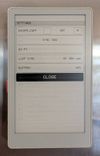
The PaperMono is an ESP32-S3 with a 3.97" 480×800 e-paper touchscreen. This project is a complete, working app for it that's small enough to read: about 2,400 lines of C++. You can use it as a shopping list, or as a starting point for your own PaperMono firmware.

What it shows on the PaperMono

  • E-paper refreshes handled properly. Taps, scrolling and typing use fast partial updates with no flash. A full refresh is forced after every 10 partial updates to keep ghosting down and protect the panel. Greys are drawn as 1-bit dot patterns, so they look the same under both refresh modes.
  • A usable touch UI on e-paper. Tap, swipe and the side buttons all work. There's an on-screen keyboard that only redraws the parts that change as you type, and it suggests items you've added before.
  • Low-power networking. Wi-Fi is on only while syncing: on a schedule you set in the web UI (say, nothing overnight and more often at weekends), sooner if you tap the screen and the last sync is more than 5 minutes stale, and straight after an edit. Everything else works offline, and edits are queued on flash until the next sync.
  • Tidy power handling. Power-button shutdown, with a deep-sleep fallback for when USB power stops the power IC switching off. The device turns itself off at a safe battery voltage. The frontlight is off by default.
  • Documented bring-up. The power IC, IO expander, panel and touch controller are brought up in a known-good order. docs/hardware.md has the pin map, I²C addresses and the quirks found along the way.

How it works

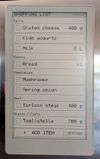
The device shows the list grouped by aisle, in the order you walk the shop. Tap an item to tick it off, or add one with the on-screen keyboard. Everyone else adds things from their phone.

A small server in between stores the list. It remembers which aisle every item belongs to and can optionally sort brand-new items into the right aisle with Claude.

  • Grouped by aisle, in walking order. You set the aisle order once from the phone, and both screens follow it.
  • Works offline. The list, suggestions, ticking off and adding all work without a connection, including in a shop with no signal.
  • Remembers your items. Every name you've added goes into a catalog that drives suggestions on both the device and the phone.
  • Optional auto-sorting. The first time the server sees a name, it can send it to Claude to file it under an aisle. If you move an item to a different aisle by hand, that correction sticks.