PaperCat icon
PaperCat icon

PaperCat

PaperCat turns scanned letters and documents into a searchable local archive, automatically identifying important details, deadlines and required actions with AI.
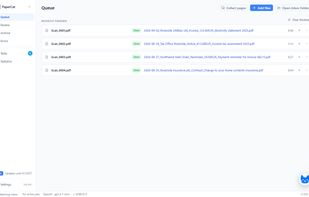
New scans run through OCR and AI analysis on their own and land in the archive with a descriptive file name.

Cost / License

  • Freemium (Pay once)
  • Proprietary

Application type

Platforms

  • Windows
0likes
0articles
Save

Features

Properties

  1.  Privacy focused
  2.  AI-Powered

Features

  1.  Dark Mode
  2.  Full-Text Search
  3.  File Tagging
  4.  No Tracking
  5.  Built-in viewer
  6.  Ad-free
  7.  No Coding Required
  8.  No registration required
  9.  OCR
  10.  Works Offline
  11.  In-document search
  12.  Scan documents
  13.  Built-in AI Assistant

PaperCat News & Activities

Highlights All activities

Recent activities

PaperCat information

  • Developed by

    DE flagPatrick Schwarzer
  • Licensing

    Proprietary and Freemium product.
  • Pricing

    One time purchase (perpetual license) that costs up to $99 + free version with limited functionality.
  • Alternatives

    5 alternatives listed
  • Badge

    Get an embeddable badge for PaperCat
  • Supported Languages

    • English
    • German
PaperCat was added to AlternativeTo by PaperCat on and this page was last updated .

No comments or reviews, maybe you want to be first?

What is PaperCat?

PaperCat is a desktop document manager for turning scanned mail, PDFs and images into an organized, searchable archive on your own computer. New documents can be picked up automatically from a watched folder. PaperCat performs local OCR, makes scans searchable and uses the AI provider of your choice to understand what each document is about. It can identify senders, document types, dates, amounts, due dates, deadlines, required actions and other useful information, then rename and archive the document automatically. PaperCat goes beyond document storage. It keeps track of outstanding tasks and deadlines, can prepare replies as email or printable letters, assigns documents to different people, detects uncertain scans and duplicates, and lets you search the full text of your archive. A Document Assistant can answer questions about an open document, while a separate App Assistant helps with PaperCat itself, knows your current settings and can guide you directly to the relevant part of the application. Documents and the search index stay on your computer. There is no PaperCat cloud account or proprietary archive format. You can use OpenAI, Anthropic, Google Gemini or compatible providers with your own API key, or keep AI processing local with tools such as Ollama or LM Studio. PaperCat Free is available for private use and includes the complete core workflow. Pro adds features such as unlimited documents, tasks, statistics, duplicate detection and advanced assistant features. Business provides the same full feature set for commercial use.

