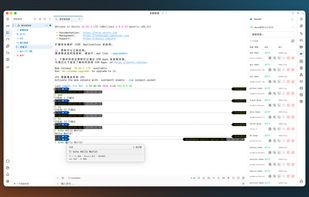
OxideTerm is a free, open-source SSH client and remote workspace for Windows, macOS and Linux. Built with Rust and GPUI, it uses a native GPU-rendered interface without a WebView. Terminals, file transfers, remote editing, port forwarding and host tools are available in one application. Background SSH parsing and compact scrollback storage help keep resource use down during long-running sessions.
A workspace can combine up to 16 panes in a single tab, mixing local and remote terminals with SFTP, editors, notes and other pages. Running terminals can be rearranged or moved into separate windows without reconnecting.
The built-in editor can work through SFTP or use the current SSH shell directly. After switching users or entering a container, an idle terminal can be converted into an editor that retains its current user, environment and directory. Pure-shell file access requires Linux and GNU utilities and does not install a remote agent; an agent-based mode is also available. Users can return to the original terminal after editing.
File tools include a dual-pane SFTP browser, a sidebar that follows the active SSH host, transfer queues, resumable transfers and drag-and-drop uploads to the terminal's current directory. Terminal features include semantic coloring, command-output folding, search, session recording, graphics protocols and native tmux control-mode integration.
OxideSens provides optional AI assistance using a provider and API key chosen by the user. External clients such as Codex can access connections, terminals, files and host tools through MCP, with explicit, revocable permissions.
SSH, local shells, Telnet, serial ports and Bluetooth LE are supported. RDP, VNC and Mosh are available through installable plugins. The plugin marketplace also provides language support, file previews and other extensions that can be updated independently. Host tools cover monitoring, processes, services, containers and related tasks on local or remote machines, with capabilities varying by platform.
OxideTerm is licensed under GPL-3.0. It requires no application account or subscription and collects no telemetry.







 LaTerrasse



No comments or reviews, maybe you want to be first?