
OwlSift icon
OwlSift icon

OwlSift

 2 likes

OwlSift is a local document workspace for Windows, macOS, and Linux with typo-tolerant full-text search, resumable indexing, and an AI assistant that supports Ollama and LM Studio.
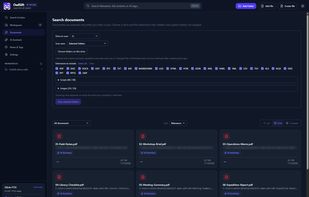
OwlSift screenshot 1

Cost / License

  • Free
  • Open Source (MIT)

Since

  • New

Updated

  • Updated Nov 2026

Platforms

  • Windows
  • Mac
  • Linux
2likes
0articles
Save

Features

Features

Highlights All activities

OwlSift News & Activities

Recent activities

  • Everything icon
    Nero656 added OwlSift as alternative to Everything
  • Frank54rus reviewed OwlSift  

    The application is cool because it sorts itself, I found old photos and text that I had previously searched for, it’s convenient, of course, as an ordinary user I don’t use it to the fullest, but it’s convenient!

  • ZloyMarxist liked OwlSift
  • Frank54rus liked OwlSift
  • Recoll icon
    Nero656 added OwlSift as alternative to Recoll, TagSpaces, DocFetcher, Curiosity Search and 1 more
  • Nero656 added OwlSift

OwlSift information

GitHub repository

  •  1 Star
  •  0 Forks
  •  0 Open Issues
  •   Updated  
View on GitHub

Our users have written 1 comment or review about OwlSift, and it has gotten 2 likes.

OwlSift was added to AlternativeTo by Nero656 on and this page was last updated .

Comments and Reviews

   
Frank54rus
1

The application is cool because it sorts itself, I found old photos and text that I had previously searched for, it’s convenient, of course, as an ordinary user I don’t use it to the fullest, but it’s convenient!

Review from a new or low-activity account — shown here, but not counted in the app rating.

Official Links

What is OwlSift?

OwlSift is an open-source desktop application for searching and organizing local documents on Windows, macOS, and Linux. It indexes selected folders and searches filenames and file contents, including supported text files and PDF, DOCX, and ODT documents with extractable text. Exact matches are ranked first, with typo-tolerant matching available for misspelled queries.

You can stop and resume scans, keep separate indexes for different collections, preview supported files, and organize documents with tags and notes. Search and indexing work offline.

An optional AI assistant can use selected documents as context for questions and summaries. It supports Ollama and LM Studio for local inference, as well as configurable cloud providers.