





OpenNOW
2 likes
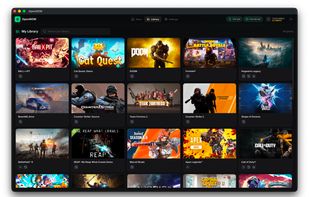
Open-source desktop client for GeForce NOW offering cross-platform support on Windows, macOS, and Linux, game browsing, library management, detailed stream controls, diagnostics overlays displaying real-time stats, built-in screenshots and recording, privacy-focused local storage, and no telemetry.

Cost / License
- Free
- Open Source (MIT)
Platforms
- Mac
- Windows
- Linux

Features
OpenNOW News & Activities
Highlights All activities
Recent activities
- ali-pxr liked OpenNOW
 Darlene Sonalder added OpenNOW as alternative to Green Vita
 Mauricio B. Holguin added OpenNOW as alternative to Xbox Cloud Gaming, Parsec, Steam Link / Steam Remote Play, Playstation Plus and 1 more
- Danilo Venom updated OpenNOW
- niksavc liked OpenNOW
- Paul updated OpenNOW
- Darlene Sonalder added OpenNOW
 Darlene Sonalder added OpenNOW as alternative to GeForce NOW, Boosteroid, GeForce Infinity, Nestri and 1 more


OpenNOW information
Developed by
OpenCloudGamingLicensing
Open Source (MIT) and Free product.Written in
Alternatives
17 alternatives listedBadge
Get an embeddable badge for OpenNOWSupported Languages

AlternativeTo Categories
Gaming Software, System & HardwareGitHub repository
- 2,465 Stars
- 178 Forks
- 32 Open Issues
- Updated


No comments or reviews, maybe you want to be first?