
OpenCRT icon
OpenCRT icon

OpenCRT

 Like

Tabbed SSH, Telnet, serial, RDP and VNC terminal client for Windows, macOS and Linux, modelled on the workflow of SecureCRT and written from scratch in Rust.
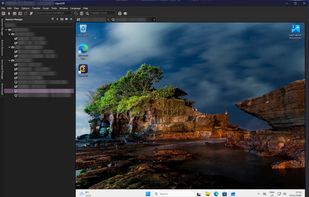
Windows RDP Session, autoscaled to application size

Cost / License

Application type

Since

  • New

Updated

  • Updated Nov 2026

Platforms

  • Windows
  • Mac
  • Linux
0likes
0articles
Save

Features

Properties

Features

Highlights All activities

OpenCRT News & Activities

Recent activities

OpenCRT information

AlternativeTo Category

Network & Admin

GitHub repository

  •  37 Stars
  •  3 Forks
  •  2 Open Issues
  •   Updated  
View on GitHub

Popular alternatives

View all
OpenCRT was added to AlternativeTo by KimP0ssible-no on and this page was last updated .

No comments or reviews, maybe you want to be first?

What is OpenCRT?

OpenCRT is a free, open source terminal client for Windows, macOS and Linux. It follows the look and workflow of SecureCRT and is written from scratch in Rust. It is an independent clean-room project: no SecureCRT code was used, and it is not affiliated with VanDyke Software.

Protocols

  • SSH2 with password, keyboard-interactive and public key logins (OpenSSH and PuTTY PPK keys, SSH agent, Pageant), jump hosts and port forwarding
  • Telnet, RLogin, raw TCP (client, server and UDP) and serial ports
  • Local shells, including PowerShell, Command Prompt and WSL on Windows
  • Remote Desktop (RDP) and VNC in a tab, next to your terminal sessions

Sessions and tabs

  • Session Manager with folders, filter, drag and drop and Connect All
  • Tabs with reconnect, clone, a colour per session and a live preview on hover
  • Quick Connect and a connect bar that remembers recent targets
  • Button Bar, Command Manager and a Command Window that sends input to one tab or all tabs
  • Keyword highlighting with any colour, bold and regular expressions

Terminal

  • xterm emulation with 256 colours, truecolour and mouse reporting
  • Twenty colour schemes, light and dark themes that follow the system
  • A built-in font, system fonts or any fixed-width font file
  • Session logging, raw logs and recordings in asciicast format

File transfer

  • SFTP in a tab, as a command prompt or as a two-pane file browser with a transfer queue
  • Zmodem downloads

Automation

  • Runs SecureCRT's Python scripts unchanged
  • Rhai scripting with a script recorder
  • Logon scripts per session

Coming from SecureCRT

  • Imports SecureCRT sessions, button bars and keyword lists with their colours
  • Imports ~/.ssh/config and Remote Desktop .rdp files

Security

  • Host keys are checked against OpenCRT's own known_hosts, and a changed key blocks the connection
  • Saved passwords live in the system keychain, or encrypted under a master password (Argon2id, AES-256-GCM)
  • Windows installers are code signed, and Linux packages come from signed apt, dnf, zypper and pacman repositories

More

  • Settings Sync keeps sessions, options and scripts in your own private git repository, shared by all your computers
  • The interface is available in 29 languages
  • Checks for new versions and updates itself
  • Licensed under Apache-2.0