OpenCapture icon
OpenCapture icon

OpenCapture

A browser extension that captures an entire scrolling web page as a single image or PDF, with all processing done locally on your device.
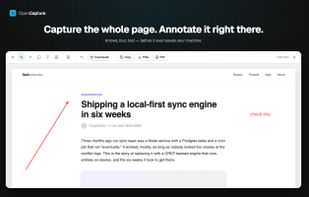
A full-page capture opened in the built-in editor — add arrows, text and blur, then export to PNG or PDF. Nothing is uploaded at any point.

Cost / License

  • Freemium (Pay once)
  • Open Source (AGPL-3.0)

Application type

Platforms

  • Google Chrome
  • Mozilla Firefox
  • Microsoft Edge
0likes
0comments
0articles

Features

Properties

  1.  Privacy focused

Features

  1.  Annotate Screenshot
  2.  Ad-free
  3.  No registration required
  4.  Works Offline
  5.  Full-page Screenshot
  6.  No Tracking
  7.  Browser extension
  8.  Export to PDF

OpenCapture News & Activities

Highlights All activities

Recent activities

OpenCapture information

  • Developed by

    OpenCapture
  • Licensing

    Open Source (AGPL-3.0) and Freemium product.
  • Pricing

    One time purchase (perpetual license) ranging between $5 and $20 + free version with limited functionality.
  • Written in

  • Alternatives

    14 alternatives listed
  • Supported Languages

    • English

AlternativeTo Categories

Photos & GraphicsWeb Browsers

GitHub repository

  •  0 Stars
  •  0 Forks
  •  1 Open Issues
  •   Updated  
View on GitHub
OpenCapture was added to AlternativeTo by TheaY on and this page was last updated .
No comments or reviews, maybe you want to be first?

What is OpenCapture?

OpenCapture captures an entire scrolling web page as one seamless image, then lets you crop, annotate, blur or redact anything sensitive, and export the result to PNG or PDF.

What sets it apart from most full-page screenshot extensions is where the work happens: every pixel operation runs locally in a Rust/WebAssembly core inside your own browser. No account is required, nothing is uploaded, and no server ever receives the page you captured. Awesome Screenshot and Lightshot route captures through their own infrastructure; ShareX keeps everything local but is Windows-only and not a browser extension.

The extension is open source under AGPL-3.0, so the privacy claim is auditable rather than a promise.

Annotation includes crop, arrow, rectangle, text and blur, and every edit stays reversible until you export. Three capture modes are available — full page, visible area, and selected region — and the last 50 captures stay available in a local history that never syncs anywhere.

Everything is free. The only paid feature is watermarking — a tiled logo or text across exports with adjustable opacity, position and angle — unlocked with a one-time credit purchase rather than a subscription.