SupaKit icon
SupaKit icon

SupaKit

SupaKit is a browser-based workspace built around shareable spaces. Open notes, whiteboards, maps, AI chat, voice and video calls, screen sharing, cloud browsing, coding, data tools, and more in one tab.
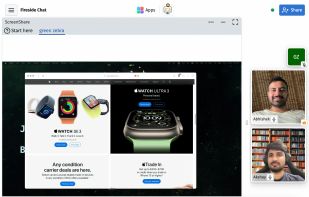
Present your screen(s).
You can start a huddle in any Space

Cost / License

  • Freemium (Subscription)
  • Proprietary

Platforms

  • Online
  • Software as a Service (SaaS)
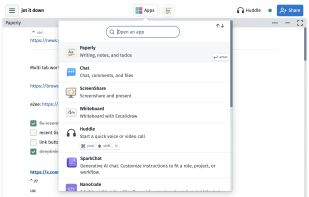
Open an app in your space with a click
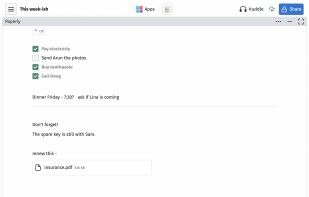
Use Paperly when you just want a piece of paper to take notes, jot thoughts, keep track of small things, and more.
+3
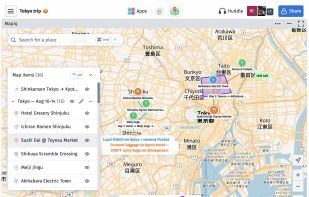
Make your own unique maps for collections, trips, real-estate, prospecting etc.
Alternatives
1like
0alternatives
0articles
Save

Features

Properties

  1.  Privacy focused
  2.  AI-Powered

Features

  1.  No registration required
  2.  Syntax Highlighting
  3.  WYSIWYG Support
  4.  Command line interface
  5.  Desktop Sharing
  6.  Real time collaboration
  7.  Works Offline
  8.  Dark Mode
  9.  Full-Text Search
  10.  No Tracking
  11.  Cloud Sync
  12.  Ad-free
  13.  Support for MarkDown
  14.  End-to-End Encryption
  15.  Meeting
  16.  Team Collaboration
  17.  Online collaboration

SupaKit News & Activities

Highlights All activities

Recent activities

  • Akshay Kumar updated SupaKit
  • Akshay Kumar updated SupaKit

SupaKit information

AlternativeTo Categories

Office & Productivity, OS & Utilities, Remote Work & Education, Social & Communications, Web Browsers, Security & Privacy

GitHub repository

  •  282 Stars
  •  62 Forks
  •  14 Open Issues
  •   Updated  
SupaKit was added to AlternativeTo by Paul on and this page was last updated .

No comments or reviews, maybe you want to be first?

Featured in Lists

Video calling

By Francisco Ferioli Marco31 appsUpdated

Official Links

What is SupaKit?

SupaKit is a browser-based workspace built around shareable spaces. Open notes, whiteboards, maps, AI chat, voice and video calls, screen sharing, cloud browsing, coding, data tools, and more in one tab. Create a space for an idea, class, client, or project, then work solo or share a link so others can collaborate live. No install or account is required for guests. Content is end-to-end encrypted between participants by default, and spaces remain available offline on your device.