OneMouse icon
OneMouse icon

OneMouse

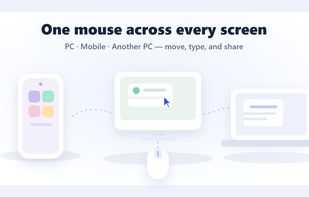
Share one mouse and keyboard between a Windows PC, Android phones and tablets, and Apple Silicon Macs by moving the cursor across the screen edge.
OneMouse screenshot 1

Cost / License

  • Freemium (Pay once)
  • Proprietary

Platforms

  • Mac  Apple Silicon only, macOS 13 or later. Connects over the local network and receives control from a Windows PC; it cannot act as the host. Distributed as a signed and notarized DMG, not via the Mac App Store.
  • Windows  Windows 10/11, 64-bit. The Windows PC is always the host that shares its mouse and keyboard.
  • Android  Android 8.0 (API 26) or later. Requires the Accessibility service to apply mouse and keyboard input. Receives control from a Windows PC; it cannot act as the host.
  • Samsung Galaxy Store  Android 8.0 (API 26) or later. Requires the Accessibility service to apply mouse and keyboard input. Receives control from a Windows PC; it cannot act as the host.
  • Android Tablet  Android 8.0 (API 26) or later. Requires the Accessibility service to apply mouse and keyboard input. Receives control from a Windows PC; it cannot act as the host.
OneMouse screenshot 1
OneMouse screenshot 2
+5
OneMouse screenshot 3

Features

Properties

  1.  Privacy focused

Features

  1.  No registration required
  2.  Portable
  3.  Works Offline
  4.  No Tracking
  5.  Screen Sharing
  6.  Mouse Sharing

OneMouse News & Activities

Highlights All activities

Recent activities

OneMouse information

  • Developed by

    KR flagOneMouse
  • Licensing

    Proprietary and Freemium product.
  • Pricing

    One time purchase (perpetual license) that costs up to $4 + free version with limited functionality.
  • Alternatives

    0 alternatives listed
  • Badge

    Get an embeddable badge for OneMouse
  • Supported Languages

    • English
    • Korean
    • Japanese
    • Chinese
    • Spanish
OneMouse was added to AlternativeTo by sdlckdrl on and this page was last updated .
No comments or reviews, maybe you want to be first?

Official Links

What is OneMouse?

OneMouse is mouse and keyboard sharing software (a software KVM) that lets one Windows PC control Android phones and tablets, other Windows PCs, and Apple Silicon Macs running macOS 13 or later. Push the cursor past the edge of your screen and it appears on the next device, which behaves like an extra monitor — no cables, no ADB, and no brand requirement.

Unlike most software KVMs, which link computers only, OneMouse also targets Android devices, so a phone or tablet on the desk can be typed on directly instead of mirrored in a window.

Features:

  • Move the mouse and keyboard across the screen edge between Windows, Android, and Mac
  • Send files and folders between paired devices
  • Sync clipboard text between devices
  • Connect over Wi-Fi/LAN or Bluetooth (Mac uses LAN by default; Mac Bluetooth is a beta option)
  • Arrange devices around the Windows monitor to match your physical desk
  • Optional remote-control window for viewing a device's screen
  • Keyboard shortcuts for device switching, volume, brightness, and screenshots

Privacy: pairing is local, using a 6-digit code or QR code with SPAKE2 key exchange. There is no account, no sign-in, and no relay server — input, files, and clipboard data move directly between your own paired devices.

Limitations: a Windows 10/11 PC must be the host. Linux, iPhone, and iPad are not supported, and Macs must be Apple Silicon on macOS 13+. The Windows and Mac apps are free; the Android app has a free tier with ads and daily clipboard/file limits, removed by a one-time Pro unlock.

OneMouse Videos

