Omnia Music Player icon

Omnia Music Player

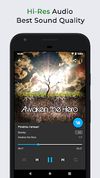
Omnia Music Player is a powerful music player for Android. It is an offline audio player without advertisements. Its gorgeous user interface matches every single detail of the material design guidelines.

Omnia Music Player screenshot 1
Omnia Music Player screenshot 2
+5
Omnia Music Player screenshot 3

Cost / License

  • Freemium (Pay once)
  • Proprietary

Platforms

  • Android
1like
0articles
Save

Features

Properties

Features

Highlights All activities

Omnia Music Player News & Activities

Recent activities

Omnia Music Player information

  • Developed by

    CN flagRhythm Software
  • Licensing

    Proprietary and Freemium product.
  • Pricing

    One time purchase (perpetual license) that costs $4 + free version with limited functionality.
  • Alternatives

    52 alternatives listed
  • Badge

    Get an embeddable badge for Omnia Music Player
  • Supported Languages

    • English
    • Czech
    • Dutch
    • Spanish
    • French
    • Indonesian
    • Japanese
    • Chinese
    • Korean
    • Arabic
    • Polish
    • Russian

AlternativeTo Categories

File Management, Audio & Music

Our users have written 1 comments and reviews about Omnia Music Player, and it has gotten 1 likes

Omnia Music Player was added to AlternativeTo by dinesh-58 on and this page was last updated .

Comments and Reviews

   
Top Positive Comment
0

Has the older Material Design 2 look, but that is still pretty good even today. Mainly, I like the intuitive UX (way easier to use than something like Musicolet), quick shuffle button, and automatic fetching of album, artist images.

Also supports lossless formats, last.fm scrobling.

Official Links

What is Omnia Music Player?

Omnia Music Player is a powerful music player for Android. It is an offline audio player without advertisements. Its gorgeous user interface matches every single detail of the material design guidelines.
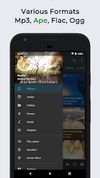
Omnia Music Player supports almost all audio formats, including mp3, ape, aac, alac, aiff, flac, opus, ogg, wav, dsd (dff/dsf), tta, etc. It has high-res output engine with best sound quality, and a 10-band equalizer, within a small footprint, less than 5 MB.

Omnia Music Player contains almost every necessary feature to fulfill all of your musical needs including: gapless playback, lyrics display, crossfade, play speed adjustment, tag editing, last.fm scrobbling, Chromecast, voice command, Android Auto, Freeverb, audio balance, ReplayGain, sleep timer, etc.

Key Features:

? Free of advertisements. ? High-resolution audio output. ? Lossless audio support such as APE. ? OpenSL / AudioTrack based output methods. ? Gorgeous user interface with material design. ? Manage and play music by album, artist, folder, and genre. ? Smart playlists with most played, recently played, and newly added tracks. ? Sava/restore playback position (useful for podcast and audiobook). ? Automatic sync missing album/artist images. ? Fast search across albums, artists, and songs. ? Volume normalization based on ReplayGain. ? Built-in metadata tag editor (mp3 and more). ? Display lyrics (embedded and lrc file). ? Support MP3 URL playlist files (m3u and m3u8). ? Support Windows media player playlist files (wpl). ? Resizable home screen widget. ? Gapless playback support. ? 10-band equalizer and 15 pre-built presets. ? Flexible reverb settings powered by Freeverb. ? Up to 32-bit/768kHz USB DAC support on Android 14+. ? Sound balance adjustment. ? Play speed adjustment. ? Crossfade support. ? Chromecast (Google Cast) support. ? Google voice commands support. ? Colorful themes, fully customizable. ? Background image from gallery. ? Android Auto support. ? Last.fm scrobbling. ? Sleep timer.

Omnia Music Player vs. Pulsar Music Player:

Omnia Music Player is the sister application of Pulsar Music Player. It contains following differentiation:

? New user interface and experience. ? Built-in audio engine, decoder and library. ? 10 bands equalizer and 15 presets. ? Reverb settings powered by Freeverb. ? More flexible preference settings.

Support Development:

If you can help to translate this audio player to your native language, or there is any mistake in current translation, please contact our email: support@rhmsoft.com.

If you run into any issues or have any suggestions while using this audio player, please feel free to contact us: support@rhmsoft.com.

Omnia Music Player Videos