OCR (Optical Character Recognition) icon

OCR (Optical Character Recognition)

 Like

Free, open source OCR for Mac: a keyboard shortcut, a drag over the screen, and the text or QR code in that area is copied.
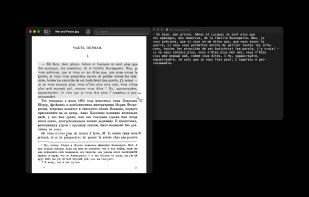
Option-Command-6 and a drag over the first page of War and Peace; TextEdit holds what OCR copied, French and Russian in one line.

Cost / License

  • Free
  • Open Source (MIT)

Since

  • New

Updated

  • Updated Nov 2026

Platforms

  • Mac  Apple silicon, macOS 13 or later
0likes
0articles
Save

Features

Features

Highlights All activities

OCR (Optical Character Recognition) News & Activities

Recent activities

OCR (Optical Character Recognition) information

AlternativeTo Category

Office & Productivity

GitHub repository

  •  5 Stars
  •  0 Forks
  •  0 Open Issues
  •   Updated  
View on GitHub

Popular alternatives

View all
OCR (Optical Character Recognition) was added to AlternativeTo by Herman Harazha on and this page was last updated .

No comments or reviews, maybe you want to be first?

Official Links

What is OCR (Optical Character Recognition)?

OCR copies text that can't be selected: pictures, scanned PDFs, video frames, app windows. Press Option-Command-6, drag over any part of the screen, and the text in that area goes to the clipboard. If the area holds a QR code or another barcode, what it encodes is copied instead.

It has no recognition engine of its own: it joins the screen selection of macOS (the same crosshair as Shift-Command-4) and Apple's Vision. Recognition runs on the Mac, offline. No history, no logs; the captured picture is deleted right after reading.

The languages are the ones Vision has on the installed macOS, detected line by line with nothing to pick: 14 on macOS 13, 33 on macOS 27, among them English, Chinese, Japanese, Korean, Arabic, Hindi, Russian, Ukrainian and most European languages. Large areas are also read in tiles, so small lines are not lost.

Interface in English, Ukrainian and Russian. Needs the Screen Recording permission to read the selected area. The only network call is a daily update check. Native Swift. Apple silicon, macOS 13 or later. Signed with a Developer ID and notarized by Apple. MIT license.
