
NuviraHub icon
NuviraHub icon

NuviraHub

 Like

NuviraHub is an open source (AGPL-3.0) remote desktop and remote support application written in Rust. Computers connect by ID and password, or with unattended access through a permanent password, also at the sign-in and lock screens on Windows, macOS and Linux (GNOME and KDE...
NuviraHub screenshot 1

Cost / License

  • Freemium (Subscription)
  • Open Source (AGPL-3.0)

Since

  • New

Updated

  • Updated Nov 2026

Platforms

  • Windows
  • Mac
  • Linux
  • Self-Hosted
  • Google Chrome
  • Mozilla Firefox
  • Safari
0likes
0articles
Save

Features

Features

Highlights All activities

NuviraHub News & Activities

Recent activities

NuviraHub information

  • Developed by

    IT flagnuvira-hub
  • Licensing

    Open Source (AGPL-3.0) and Freemium product.
  • Pricing

    Subscription ranging between $3 and $10 per month + free version with limited functionality.
  • Written in

  • Alternatives

    28 alternatives listed
  • Badge

    Get an embeddable badge for NuviraHub
  • Supported Languages

    • English
    • Italian
    • German
    • French
    • Spanish

AlternativeTo Category

Network & Admin

GitHub repository

  •  1 Stars
  •  0 Forks
  •  0 Open Issues
  •   Updated  
View on GitHub
NuviraHub was added to AlternativeTo by Alessandro-Blason on and this page was last updated .

No comments or reviews, maybe you want to be first?

Official Links

What is NuviraHub?

NuviraHub is an open source (AGPL-3.0) remote desktop and remote support application written in Rust. Computers connect by ID and password, or with unattended access through a permanent password, also at the sign-in and lock screens on Windows, macOS and Linux (GNOME and KDE Plasma on Wayland).

Sessions are end-to-end encrypted between the two devices (QUIC with pinned device keys). The server only brokers and relays the connection. It runs as a single Docker image on a single port, and also delivers the signed app updates to the devices registered on it. A public server is used by default for those who do not host their own.

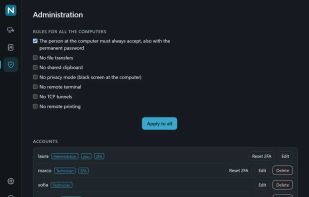
Features include file transfer, clipboard sharing (text and images), chat, remote terminal, remote printing, session recording, TCP tunnels, privacy mode, remote restart with reconnection and hardware video encoding. Deployment tools cover whole fleets: MSI and Group Policy on Windows, .pkg and configuration profile on macOS, and a policy file on Linux.

An optional Pro licence for self-hosted servers adds shared address books, accounts and roles, a web console, 2FA and OIDC single sign-on, a session log, a support queue, an inventory, a browser client and a REST API. The open source apps and server are free, including for commercial use.