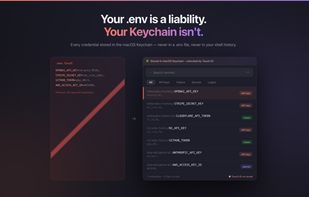
NoxKey is a macOS secret manager built on the system Keychain. It stores the credentials a developer needs every day — API keys, access tokens, database URLs, login passwords — encrypted by the Secure Enclave, with Touch ID required for every read. No master password, no account, no cloud sync.
What makes it different is that the same vault is usable by AI coding agents. The app bundles an MCP (Model Context Protocol) server, so Claude Code, Cursor, Codex, Windsurf, and any other MCP-aware tool can call noxkey_get to fetch a secret. You approve with Touch ID; the value is delivered as a self-deleting ChaChaPoly-encrypted Bash script the agent sources into its environment. The raw secret never enters the model's chat context, transcripts, or screen recordings — unlike pasting the key into the conversation or sourcing a plain .env in the agent's terminal.
The daily flow:
- Bring secrets in. Add them from the Cmd+Shift+1 panel, or ask your AI agent to onboard a project: it calls noxkey_scan to list every key in the project's .env files (read-only), the app raises a native review sheet, one Touch ID writes the batch to the Keychain. Then delete the .env — nothing left on disk to commit.
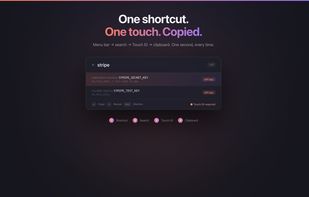
- Use them yourself. Cmd+Shift+1 opens a Spotlight-style panel. Type to search, Touch ID to copy.
- Use them in an agent. The agent calls noxkey_get, you Touch ID, the value lands as an env var via the encrypted handoff.
- Share scoped subsets. noxkey_package_create mints a sealed, time-boxed .noxkey package — a chosen subset of secrets for a sub-agent, CI runner, or teammate. One Touch ID covers the batch at mint time. The receiver sees only the packaged secrets, can't make network calls (kernel-blocked), and the package expires automatically.
How it compares:
- vs .env files — encrypted at rest, Touch ID per access, can't be committed because the file is gone once imported.
- vs 1Password CLI / Bitwarden CLI — no subscription, no server, no network entitlement. The AI-agent path is first-class, not a CLI shell-out.
- vs Doppler / Infisical / HashiCorp Vault — local, individual-developer scale. No SaaS dependency, no quorum unseal ceremony.
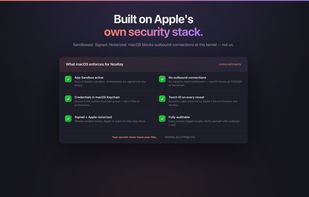
Verify it yourself. The bundle ships without com.apple.security.network.client, so the App Sandbox kernel-blocks every outbound connection — for the app and for sealed packages. Run codesign -d --entitlements - /Applications/NoxKey.app to confirm. Distributed exclusively through the Mac App Store; every build is re-signed by Apple App Review, with no in-app updater (Apple guideline 2.4.5(vii) prohibits one). Source on GitHub. Walkthrough at noxkey.ai/integrity.html.
Trade-off: macOS only, by design. The whole pitch is hardware Keychain + Secure Enclave + Touch ID + App Sandbox.






 EU
EU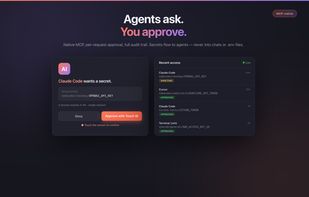




 Noboxdev
No comments or reviews, maybe you want to be first?