
Nota icon
Nota icon

Nota

Nota — a free DAW for macOS, Windows and Linux. No subscription, no account — just open it and make music.
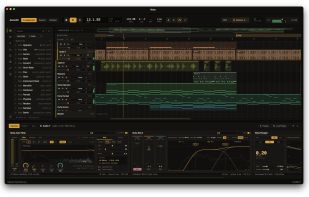
Nota screenshot 1

Cost / License

Platforms

  • Windows  If SmartScreen shows "Windows protected your PC", click More info → Run anyway.
  • Mac  Open System Settings → Privacy & Security and scroll down to Security. You'll see "Nota" was blocked to protect your Mac. Click Open Anyway, confirm with your password or Touch ID, then click Open Anyway once more.
  • Linux  Make the AppImage executable (chmod +x Nota-*.AppImage, or Properties → Permissions in your file manager) and run it.
0likes
0articles
Save

Features

Properties

Features

Highlights All activities

Nota News & Activities

Recent activities

Nota information

AlternativeTo Categories

Audio & Music, AI Tools & Services, System & Hardware

GitHub repository

  •  38 Stars
  •  2 Forks
  •  5 Open Issues
  •   Updated  
View on GitHub

Popular alternatives

View all
Nota was added to AlternativeTo by Egor Khindikaynen on and this page was last updated .

No comments or reviews, maybe you want to be first?

Official Links

What is Nota?

Nota — a free DAW for macOS, Windows and Linux. No subscription, no account — just open it and make music.

Features

  • Three views — Arrangement timeline, Session clip grid, and a Modular signal-graph editor with CV modulation (LFO / envelope follower / MIDI→CV / ADSR / Macro / Math, patched onto any parameter).
  • Tracks & mixer — audio, MIDI, group (nestable), return and master tracks; sends; MIDI routing between tracks; peak/RMS and true-peak meters.
  • MIDI — piano roll with quantize and velocity; play from a MIDI keyboard, the computer keyboard, a gamepad (macOS) or your phone; drag in .mid files; turn audio into MIDI (melody / harmony / drums / slice).
  • Audio — record from inputs and internal buses; import WAV/AIFF/FLAC/MP3; fades, gain and per-clip envelopes; warp / time-stretch.
  • Automation & MIDI Learn — draw or record automation on any parameter; map hardware knobs to almost anything.
  • Browser — preview presets, drum kits, effects and samples before you load them.
  • Version history — every save is kept; go back to any earlier version of a song, or branch off from it.
  • Export — the master or stems to WAV (16/24-bit or 32-bit float), with true-peak normalize and dither.
  • AI control (optional) — a local MCP server lets an AI assistant such as Claude work in the open project. Off by default.

Nota Videos
