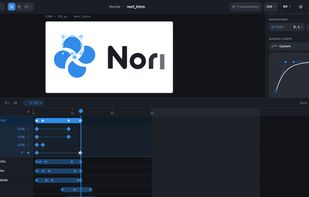
Nori is a vector animation and motion design studio that runs entirely in the browser. It focuses on the essentials of animation (layers, keyframes and easing curves) so that simple animations such as an animated logo, a bouncing icon or a presentation transition can be made in minutes, without the learning curve of a full post-production suite.
Projects are built from shape and text layers (rectangles, pills, ellipses, triangles, polygons, stars and editable text) on a vector canvas. Each property has its own keyframes on a timeline, with spring, Bézier, ease-in/out, back, bounce and linear easing curves, a live curve preview and custom Bézier handles. Layers can be grouped, combined with boolean operations (union, subtract, intersect, exclude) that stay editable and animatable, and their vertices can be animated to morph shapes. Fills, strokes, rounded corners, drop and inner shadows and Gaussian blur are also supported.
Animations can be exported to GIF, MP4, WebM, animated SVG, Lottie (regular or optimized for the web) and Nori's own JSON format, with configurable resolution, frame rate, antialiasing, motion blur and transparent background. Lottie animations, SVG files and Figma selections can be imported or pasted directly onto the canvas.
Nori is offline-first and requires no account or subscription. Projects are stored in the browser or, in Chromium-based desktop browsers, in a local folder chosen by the user, with one human-readable JSON file per project that can be backed up or synced with Drive, Dropbox or OneDrive. There are no limits on the number of projects or export formats.
The interface is available in English and Spanish, with light and dark themes, and Nori can be installed as a Progressive Web App. It is open source under the Apache 2.0 license and can also be self-hosted as a static site.







 Juan-Pablo-P-rez added Nori Animation as alternative to LottieFiles, Rive, Jitter, Blazy and 6 more


No comments or reviews, maybe you want to be first?