Nocebo Launcher icon

Nocebo Launcher

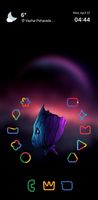
Nocebo Launcher completely redefines your Android home screen with a unique, shapeshifting layout. Built for users who value premium aesthetics and deep customization, it moves away from traditional static grids and introduces a fluid interface that behaves like an interactive spinner.

Nocebo Launcher screenshot 1

Cost / License

  • Free
  • Proprietary

Application type

Platforms

  • Android
0likes
0comments
0articles

Features

Properties

  1.  Support for Themes
  2.  Privacy focused

Features

  1.  Dark Mode
  2.  Ad-free
  3.  No Tracking
  4.  No registration required
  5.  Support for Gestures
  6.  Works Offline
  7.  Extensible by Plugins/Extensions
  8.  Application Launchers

Nocebo Launcher News & Activities

Highlights All activities

Recent activities

Nocebo Launcher information

  • Developed by

    TR flagNocebo
  • Licensing

    Proprietary and Free product.
  • Alternatives

    18 alternatives listed
  • Supported Languages

    • English
    • German
    • Italian
    • Greek
    • Arabic
    • Bengali
    • Bulgarian
    • Catalan; Valencian
    • Chinese
    • Croatian
    • Czech
    • Danish
    • Dutch
    • Estonian
    • Finnish
    • French
    • Gujarati
    • Hebrew
    • Hindi
    • Hungarian
    • Icelandic
    • Indonesian
    • Japanese
    • Kannada
    • Korean
    • Latvian
    • Lithuanian
    • Malayalam
    • Marathi
    • Norwegian
    • Persian
    • Polish
    • Portuguese
    • Panjabi, Punjabi
    • Romanian
    • Russian
    • Slovak
    • Slovene
    • Spanish
    • Swahili
    • Swedish
    • Tamil
    • Telugu
    • Thai
    • Turkish
    • Ukrainian
    • Urdu
    • Vietnamese
    • Zulu

AlternativeTo Category

OS & Utilities
Nocebo Launcher was added to AlternativeTo by NoceboLauncher on and this page was last updated .
No comments or reviews, maybe you want to be first?

What is Nocebo Launcher?

Nocebo Launcher completely redefines your Android home screen with a unique, shapeshifting layout. Built for users who value premium aesthetics and deep customization, it moves away from traditional static grids and introduces a fluid interface that behaves like an interactive spinner.
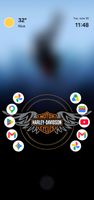
Key Features:

Spinning Layout: Navigate your device through a completely unique, rotating home screen designed for fast and intuitive access.

Center Sticker: Personalize the core of your spinner interface with a customizable center sticker to match your style.

Dynamic App Drawer: Take full control of your organization. The app drawer supports intuitive drag-and-drop sorting, custom folders, and direct widget integration.

Highly Configurable: Tailor every aspect of the UI to fit your exact needs, whether you prefer minimalist layouts or complex, feature-dense setups.

Experience a modern, highly responsive launcher built for ultimate control and fluid navigation.

Permission explanations Nocebo Launcher uses the AccessibilityService permission for optional support of making certain system functions more accessible, such as with desktop gestures, like turning the screen off. Nocebo Launcher will automatically prompt you to enable this if it is necessary for your configuration; for many cases it is not! No data is collected from the AccessibilityService; it is merely used to invoke system actions.

Nocebo Launcher uses the Device Administrator permission to lock the screen when a selected gesture is detected. This is optional and disabled by default.

Nocebo Launcher Videos

Official Links