nocal icon
nocal icon

nocal

nocal is for meeting-heavy people who need a calendar that helps them focus and remain highly productive.
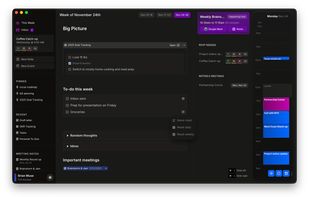
nocal homescreen

Cost / License

  • Freemium (Subscription)
  • Proprietary

Platforms

  • Mac
  • Windows
  • Google Calendar
  • Android
17likes
1comment
0articles

Features

  1.  Cloud Sync
  2.  Dark Mode
  3.  Works Offline
  4. Google Calendar icon  Sync with Google Calendar
  5.  Calendar Integration
  6.  Subtasks
  7.  Calendar View
  8.  Recurring Tasks
  9.  Ad-free
  10.  Support for MarkDown
  11. Google Calendar icon  Google Calendar integration
  12.  Rsvp
  13.  Meeting notes
  14.  AI-Powered
  15.  Natural Language Processing

nocal News & Activities

Highlights All activities

Recent News

No news, maybe you know any news worth sharing?
Share a News Tip

Recent activities

  • marcin-dudek-dev liked nocal
  • zidkim rated nocal  
  • zidkim liked nocal
  • pordon rated nocal  
  • pordon liked nocal
  • Guest rated nocal  
  • jurijs liked nocal
  • erdemovali reviewed nocal  

    It's great that it syncs with Google Calendar

  • erdemovali and dhruvil2511 liked nocal

nocal information

  • Licensing

    Proprietary and Freemium product.
  • Pricing

    Subscription ranging between $5 and $10 per month + free version with limited functionality.
  • Alternatives

    50 alternatives listed
  • Supported Languages

    • English

Our users have written 1 comments and reviews about nocal, and it has gotten 17 likes

nocal was added to AlternativeTo by Paul on and this page was last updated .

Comments and Reviews

   
Erdem Ovali
0

It's great that it syncs with Google Calendar

What is nocal?

nocal is for meeting-heavy people who need a calendar that helps them focus and remain highly productive. A calendar that adapts to your workflow, not the other way around. Every feature is designed with focus and clarity in mind.

  • A calendar built for focus: Quickly peek at upcoming events when needed, then let them fade into the background. No more overwhelming grid views. nocal automatically surfaces what matters.
  • Rich note-taking that works offline: Turn every week into a project boards. Embed task lists, tables, sub-notes, meeting notes and more. Full Markdown support.
  • Connected notes & events: Seamlessly reference meetings in your notes and notes in your meetings. Create a web of connected thoughts that evolves with your work.
  • Unified calendar inbox for all your calendar accounts.
  • NLP scheduling: Schedule meetings as easily as typing "Lunch with Alex tomorrow at noon".

nocal uses AI to make your calendar work smarter. From surfacing noteable meetings to generating weekly notes that adapt to your habits and work style, AI helps you stay focused on what matters without losing track of what's important.

Your personal command center

Transform your weekly notes into a powerful project board. Manage tasks, events, and ideas all in one place.

  • Rich components: Write in Markdown and embed rich components like tables, task lists, sub-notes, and more.
  • Quick RSVP: Manage calendar invites like an inbox. Quickly respond without opening your calendar.
  • Time travel: See how your work flows & evolves over weeks and months.
  • Weekly notes: Plan your week with AI-powered notes and task management.

Download now and transform how you manage your time.

Official Links
