Nexshot icon
Nexshot icon

Nexshot

If you want to share something on your screen, you would have to go through a few steps to take a screenshot, paste it, save it and send the file. With Nexshot, you can jump over most of these steps. The application gives you the possibility of taking snapshots of the screen and...

Nexshot screenshot 1

Cost / License

  • Free
  • Proprietary

Application type

Alerts

  • Discontinued

Platforms

  • Windows
Discontinued

Last version was released in 2018, and the website is unavailable.

3likes
2comments
0articles

Features

  1.  Live Screen Recording
  2.  Share Videos
  3.  Capture Video
  4.  Screenshot OCR
  5.  Share screenshots
  6.  Record videos

Nexshot News & Activities

Highlights All activities

Recent activities

No activities found.

Nexshot information

  • Developed by

    Nexthon
  • Licensing

    Proprietary and Free product.
  • Alternatives

    122 alternatives listed
  • Supported Languages

    • English

AlternativeTo Categories

Photos & GraphicsVideo & Movies

Our users have written 2 comments and reviews about Nexshot, and it has gotten 3 likes

Nexshot was added to AlternativeTo by Mubashar Islam on and this page was last updated .

Comments and Reviews

   
Top Negative Comment
cschaer
0

Today I want to check the App. Dec. 12 2021, redirected to a Virus WebS ite. ESET blocked this.

scalescript
0

i have downloaded new version so that's means team working on it. also nice website design. Keep it up..

What is Nexshot?

If you want to share something on your screen, you would have to go through a few steps to take a screenshot, paste it, save it and send the file. With Nexshot, you can jump over most of these steps. The application gives you the possibility of taking snapshots of the screen and share them on the fly. You can also insert annotations and other elements in your snapshots. Regardless of what you want to show on your screen, it will only take a few seconds to do it.

The application is free. It can be used on all modern Windows platforms, without any compatibility issues. The software can be installed in under a minute, without making any complicated settings. Also, you don't have to meet any special requirement and you don't need powerful hardware to run this application.

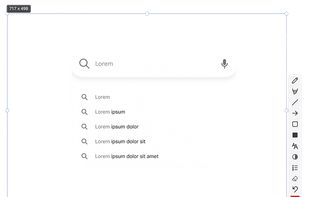
While Nexshot is running on your computer, you can take a snapshot immediately, either by hitting the PrintScreen key or by clicking its system tray icon, after which you will have to draw a rectangle over the area you want to capture. Once you draw the rectangle, a series of options will show up, for drawing, blurring, adding text and more.

Besides annotation options, you can also find a series of output options, like saving the snapshot as an image, printing it, sharing it on social media or uploading it to the cloud. If you decide to save the image to the cloud, the application will upload it right away and it will also generate a share link, which you can copy to the clipboard with a single click.

Nexshot is capable of recording your designated area as well. Though you have to download an additional tool for this purpose, the application can do it for you, without requiring any input, except for a single click. With this tool installed, you can record whatever you do withing the rectangle and use the same annotation and output options.

Taking screenshots and sharing what's on your screen can't be any easier when using Nexshot.

Official Links