The Wi-Fi icon in the menu bar answers one question: am I connected to a network? It doesn't tell you whether the internet actually answers. A hotel login page, a router that lost its uplink or a connection that crawls all look the same: full bars.
Netty is a dot in the macOS menu bar that answers the question that matters. Green means the internet answers and the connection is good. Yellow means latency, jitter or packet loss crossed a threshold. Red means a few checks in a row failed.
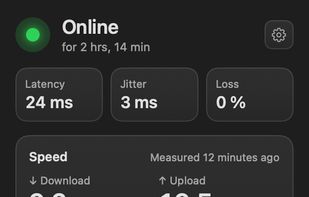
Click the dot and a popover shows latency, jitter, loss, the last speed test and your network: Wi-Fi name, Ethernet or hotspot, whether a VPN carries your traffic, and your local and public IP. You get a notification when the connection drops and when it comes back, with how long you were offline. A degraded connection never notifies, and Focus modes are respected.
How it works: Netty asks Apple's captive portal check, with Google's as a fallback, whether the internet answers, so Wi-Fi without internet or a login page counts as offline. Every 10 seconds it times a TCP handshake with 1.1.1.1 and 8.8.8.8, and it checks right away when the network changes or when you click the icon. The speed test uses Apple's built-in networkQuality: download, upload and responsiveness, on demand or on an optional schedule that skips metered networks.
Almost everything can be changed: the rules for yellow and red, which popover sections show and in what order, what each click does, and the icon itself, in color or black and white, with SF Symbols or your own image.
Nothing leaves your Mac: no analytics, no telemetry. Netty is free and open source under GPL-3.0, and needs macOS 26 or later.








 Angel L. Valdés

No comments or reviews, maybe you want to be first?